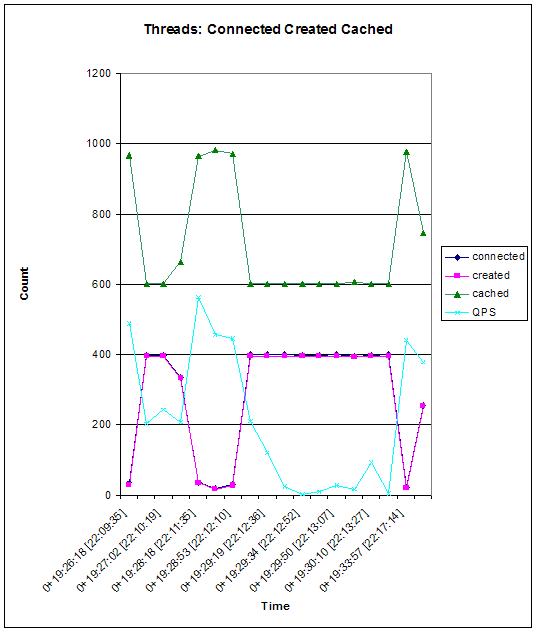
There can be several possible reasons for these sudden drops. I am working on the issue and will be posting the results. Have you experienced something similar?
[root@srv31 ~]# mkdir /google
[root@srv31 ~]# cd /google/
[root@srv31 google]# svn checkout http://google-mysql-tools.googlecode.com/svn/t                                                                             runk/ google-mysql-tools
A  google-mysql-tools/compat_logging.py
A  google-mysql-tools/compact_innodb.py
A  google-mysql-tools/compat_flags.py
A  google-mysql-tools/thread_pool.py
A  google-mysql-tools/COPYING
A  google-mysql-tools/mypgrep.py
A  google-mysql-tools/config_helper.py
A  google-mysql-tools/dbspec_lib.py
A  google-mysql-tools/command_pool.py
Checked out revision 2.
This page is locked. Only administrators and moderators may edit it.If someone with appropriate permissions to the Wiki reads this, can we please correct the link. It currently points to http://mysqlcamp.org/%3Cb%3EParticipants%3C/b%3E instead of http://mysqlcamp.org/Participants
wget http://vegan.net/tony/supersmack/super-smack-1.3.tar.gz
gunzip super-smack-1.3.tar.gz
tar -xf super-smack-1.3.tar
LDFLAGS=-lsocket -lnsl -lm
LD_LIBRARY_PATH=/usr/local/mysql/lib:/usr/ccs/lib:/usr/lib:/usr/local/lib:/lib:/usr/ucblib
PATH=/usr/bin:/usr/sbin:/usr/sfw/bin:/usr/ccs/bin:/opt/SUNWspro/bin:/usr/sbin:/usr/bin:/usr/local/bin:.:/usr/ccs/bin:/usr/local/mysql/bin
CXX=/usr/local/bin/g++
CFLAGS=-xarch=v9
CC=/opt/SUNWspro/bin/cc
CXXFLAGS=-m64
CFLAGS=-m64
[root@db:/home/fmashraqi/install/bench/super-smack-1.3] ./configure --with-mysql
checking for a BSD-compatible install... ./install-sh -c
checking whether build environment is sane... yes
checking whether make sets $(MAKE)... yes
checking for working aclocal... missing
checking for working autoconf... missing
checking for working automake... missing
checking for working autoheader... missing
checking for working makeinfo... missing
checking for sh... /bin/bash
checking for gcc... /opt/SUNWspro/bin/cc
checking for C compiler default output file name... a.out
checking whether the C compiler works... yes
checking whether we are cross compiling... no
checking for suffix of executables...
checking for suffix of object files... o
checking whether we are using the GNU C compiler... no
checking whether /opt/SUNWspro/bin/cc accepts -g... yes
checking for /opt/SUNWspro/bin/cc option to accept ANSI C... none needed
checking whether we are using the GNU C++ compiler... yes
checking whether /usr/local/bin/g++ accepts -g... yes
checking how to run the C preprocessor... /opt/SUNWspro/bin/cc -E
checking for a BSD-compatible install... ./install-sh -c
checking whether ln -s works... yes
checking for flex... flex
checking for flex... (cached) flex
checking for yywrap in -lfl... no
checking for yywrap in -ll... yes
checking lex output file root... lex.yy
checking whether yytext is a pointer... yes
checking for bison... no
checking for byacc... no
checking for compress in -lz... yes
checking for crypt in -lcrypt... yes
checking for crypt... yes
checking for libmysqlclient...
checking for mysql_real_connect in -lmysqlclient... yes
checking for mysql.h...
checking for egrep... egrep
checking for ANSI C header files... yes
checking for sys/types.h... yes
checking for sys/stat.h... yes
checking for stdlib.h... yes
checking for string.h... yes
checking for memory.h... yes
checking for strings.h... yes
checking for inttypes.h... yes
checking for stdint.h... yes
checking for unistd.h... yes
checking sys/time.h usability... yes
checking sys/time.h presence... yes
checking for sys/time.h... yes
checking for unistd.h... (cached) yes
checking whether time.h and sys/time.h may both be included... yes
checking return type of signal handlers... void
checking for gettimeofday... yes
checking for strerror... yes
configure: creating ./config.status
config.status: creating Makefile
config.status: creating src/Makefile
config.status: creating config.h
config.status: executing default-1 commands

Building with the following options:

MySQL Support..................... yes
PostgreSQL Support................ no
Oracle Support.................... no

If this is not what you intended, please re-run configure.

Thanks for using super-smack!
-lsocket -lnsl
LIBS = -L/usr/local/mysql/lib -lcrypt -lz -lsocket -lnsl
make  all-recursive
Making all in src
/usr/local/bin/g++ -DHAVE_CONFIG_H -I. -I. -I..
-I/usr/local/mysql/include    -m64 -c super-smack.cc
/usr/local/bin/g++ -DHAVE_CONFIG_H -I. -I. -I..
-I/usr/local/mysql/include    -m64 -c client.cc
/usr/local/bin/g++ -DHAVE_CONFIG_H -I. -I. -I..
-I/usr/local/mysql/include    -m64 -c engines.cc
/usr/local/bin/g++ -DHAVE_CONFIG_H -I. -I. -I..
-I/usr/local/mysql/include    -m64 -c die.cc
/usr/local/bin/g++ -DHAVE_CONFIG_H -I. -I. -I..
-I/usr/local/mysql/include    -m64 -c dictionary.cc
yacc  -d super-smack-yacc.yy && mv y.tab.c super-smack-yacc.cc
if test -f y.tab.h; then if cmp -s y.tab.h super-smack-yacc.h; then rm -f y.tab.h; else mv
y.tab.h super-smack-yacc.h; fi; else :; fi
/usr/local/bin/g++ -DHAVE_CONFIG_H -I. -I. -I..
-I/usr/local/mysql/include    -m64 -c super-smack-yacc.cc
flex   super-smack-lex.ll && mv lex.yy.c super-smack-lex.cc
/usr/local/bin/g++ -DHAVE_CONFIG_H -I. -I. -I..
-I/usr/local/mysql/include    -m64 -c super-smack-lex.cc
/usr/local/bin/g++ -DHAVE_CONFIG_H -I. -I. -I..
-I/usr/local/mysql/include    -m64 -c query.cc
query.cc: In member function `void Query_report::fd_send(int)':
query.cc:200: warning: cast from pointer to integer of different size
query.cc:200: warning: cast from pointer to integer of different size
query.cc:219: warning: cast from pointer to integer of different size
query.cc:219: warning: cast from pointer to integer of different size
/usr/local/bin/g++ -DHAVE_CONFIG_H -I. -I. -I..
-I/usr/local/mysql/include    -m64 -c parse.cc
/usr/local/bin/g++ -DHAVE_CONFIG_H -I. -I. -I..
-I/usr/local/mysql/include    -m64 -c libsmack.cc
/usr/local/bin/g++ -DHAVE_CONFIG_H -I. -I. -I..
-I/usr/local/mysql/include    -m64 -c mysql-client.cc
/usr/local/bin/g++ -DHAVE_CONFIG_H -I. -I. -I..
-I/usr/local/mysql/include    -m64 -c pg-client.cc
/usr/local/bin/g++ -DHAVE_CONFIG_H -I. -I. -I..
-I/usr/local/mysql/include    -m64 -c ora-client.cc
/usr/local/bin/g++ -DHAVE_CONFIG_H -I. -I. -I..
-I/usr/local/mysql/include    -m64 -c tcp_client.cc
In file included from tcp_client.cc:2:
tcp_client.h: In member function `TcpClient::operator void*()':
tcp_client.h:58: warning: cast to pointer from integer of different
size
/usr/local/bin/g++  -m64 -lsocket -lnsl -lm -o super-smack
super-smack.o client.o engines.o die.o  dictionary.o
super-smack-yacc.o super-smack-lex.o query.o parse.o  libsmack.o
mysql-client.o pg-client.o ora-client.o tcp_client.o
-L/usr/local/mysql/lib -lmysqlclient -L/usr/local/mysql/lib -lcrypt
-lz  -lsocket -lnsl
Undefined                       first referenced
 symbol                             in file
yyerror(char const*)                super-smack-yacc.o
ld: fatal: Symbol referencing errors. No output written to
super-smack
collect2: ld returned 1 exit status
*** Error code 1
make: Fatal error: Command failed for target `super-smack'
Current working directory
/home/fmashraqi/install/bench/super-smack-1.3/src
*** Error code 1
The following command caused the error:
set fnord ; amf=$2; dot_seen=no; target=`echo all-recursive | sed s/-recursive//`; list='src'; for subdir in $list; do   echo "Making $target in $subdir";   if test "$subdir" = "."; then     dot_seen=yes;     local_target="$target-am";   else     local_target="$target";   fi;   (cd $subdir && make  $local_target)    || case "$amf" in *=*) exit 1;; *k*) fail=yes;; *) exit 1;; esac;
 done; if test "$dot_seen" = "no"; then   make  "$target-am" || exit 1; fi; test -z "$fail"
make: Fatal error: Command failed for target `all-recursive'
Current working directory
/home/fmashraqi/install/bench/super-smack-1.3
*** Error code 1
make: Fatal error: Command failed for target `all-recursive-am'
YYCONSTand remove it.
void yyerror(YYCONST char *);
void yyerror(char *);
make  all-recursive
Making all in src
/usr/local/bin/g++ -DHAVE_CONFIG_H -I. -I. -I..
-I/usr/local/mysql/include    -m64 -c super-smack-yacc.cc
/usr/local/bin/g++  -m64 -lsocket -lnsl -lm -o super-smack
super-smack.o client.o engines.o die.o  dictionary.o
super-smack-yacc.o super-smack-lex.o query.o parse.o  libsmack.o
mysql-client.o pg-client.o ora-client.o tcp_client.o
-L/usr/local/mysql/lib -lmysqlclient -L/usr/local/mysql/lib -lcrypt
-lz  -lsocket -lnsl
/usr/local/bin/g++ -DHAVE_CONFIG_H -I. -I. -I..
-I/usr/local/mysql/include    -m64 -c gen-data.cc
/usr/local/bin/g++  -m64 -lsocket -lnsl -lm -o gen-data  gen-data.o
die.o  -L/usr/local/mysql/lib -lcrypt -lz  -lsocket -lnsl
/usr/local/bin/g++ -DHAVE_CONFIG_H -I. -I. -I..
-I/usr/local/mysql/include    -m64 -c test-dictionary.cc
/usr/local/bin/g++  -m64 -lsocket -lnsl -lm -o test-dictionary
test-dictionary.o dictionary.o die.o  libsmack.o
-L/usr/local/mysql/lib -lcrypt -lz  -lsocket -lnsl
/usr/local/bin/g++ -DHAVE_CONFIG_H -I. -I. -I..
-I/usr/local/mysql/include    -m64 -c test-client.cc
/usr/local/bin/g++  -m64 -lsocket -lnsl -lm -o test-client
test-client.o client.o engines.o die.o  dictionary.o query.o
libsmack.o mysql-client.o pg-client.o ora-client.o
-L/usr/local/mysql/lib -lmysqlclient -L/usr/local/mysql/lib -lcrypt
-lz  -lsocket -lnsl
/usr/local/bin/g++ -DHAVE_CONFIG_H -I. -I. -I..
-I/usr/local/mysql/include    -m64 -c test_tcp_client.cc
In file included from test_tcp_client.cc:1:
tcp_client.h: In member function `TcpClient::operator void*()':
tcp_client.h:58: warning: cast to pointer from integer of different
size
/usr/local/bin/g++  -m64 -lsocket -lnsl -lm -o test_tcp_client
test_tcp_client.o tcp_client.o  -L/usr/local/mysql/lib -lcrypt -lz
-lsocket -lnsl
Making install in src
/bin/bash ../mkinstalldirs /usr/local/bin
  .././install-sh -c  super-smack /usr/local/bin/super-smack
  .././install-sh -c  gen-data /usr/local/bin/gen-data
/bin/bash ./mkinstalldirs /usr/share/smacks /var/smack-data
cp -rp ./smacks/* /usr/share/smacks
$ super-smack
ld.so.1: super-smack: fatal: /usr/local/lib/libstdc++.so.5: wrong ELF
class: ELFCLASS32
Killed
[root@db:/home/fmashraqi/install/bench/super-smack-1.3] file /usr/local/bin/super-smack
/usr/local/bin/super-smack:     ELF 64-bit MSB executable SPARCV9 Version 1, dynamically linked, not stripped
[root@db:/home/fmashraqi/install/bench/super-smack-1.3] file /usr/local/lib/libstdc++.so
/usr/local/lib/libstdc++.so:    ELF 32-bit MSB dynamic lib SPARC Version 1, dynamically linked, not stripped
crle -64 -u -l /usr/local/lib/sparcv9
crle -64 -u -l /usr/sfw/lib/sparcv9
LIBS=-R/usr/sfw/lib/sparcv9 -R/usr/local/mysql/lib -lnsl -lsocket
060524 17:45:45 [ERROR] Error reading packet from server: Lost connection to MySQL server during query (server_errno=2013)
060801  9:42:13 [ERROR] Error reading packet from server: Lost connection to MySQL server during query (server_errno=2013)
060801 13:33:41 [ERROR] Error reading packet from server: Lost connection to MySQL server during query (server_errno=2013)
060801 20:41:30 [ERROR] Error reading packet from server: Lost connection to MySQL server during query (server_errno=2013)
060802  2:28:21 [ERROR] Error reading packet from server: Lost connection to MySQL server during query (server_errno=2013)
060802  3:46:29 [ERROR] Error reading packet from server: Lost connection to MySQL server during query (server_errno=2013)
060802  3:48:47 [ERROR] Error reading packet from server: Lost connection to MySQL server during query (server_errno=2013)
060802  5:02:53 [ERROR] Error reading packet from server: Lost connection to MySQL server during query (server_errno=2013)
060802  6:25:57 [ERROR] Error reading packet from server: Lost connection to MySQL server during query (server_errno=2013)
060901 21:58:11 [ERROR] Error reading packet from server: Lost connection to MySQL server during query (server_errno=2013)
060902  2:20:46 [ERROR] Error reading packet from server: Lost connection to MySQL server during query (server_errno=2013)
060902  2:53:30 [ERROR] Error reading packet from server: Lost connection to MySQL server during query (server_errno=2013)
060903 11:37:36 [ERROR] Error reading packet from server: Lost connection to MySQL server during query (server_errno=2013)
060903 18:58:28 [ERROR] Error reading packet from server: Lost connection to MySQL server during query (server_errno=2013)
060903 21:35:54 [ERROR] Error reading packet from server: Lost connection to MySQL server during query (server_errno=2013)
060904 23:23:12 [ERROR] Error reading packet from server: Lost connection to MySQL server during query (server_errno=2013)
060905  1:55:37 [ERROR] Error reading packet from server: Lost connection to MySQL server during query (server_errno=2013)
060906  1:52:49 [ERROR] Error reading packet from server: Lost connection to MySQL server during query (server_errno=2013)
060906  3:35:50 [ERROR] Error reading packet from server: Lost connection to MySQL server during query (server_errno=2013)
060906  3:55:13 [ERROR] Error reading packet from server: Lost connection to MySQL server during query (server_errno=2013)
060906  9:15:55 [ERROR] Error reading packet from server: Lost connection to MySQL server during query (server_errno=2013)
060907  0:16:43 [ERROR] Error reading packet from server: Lost connection to MySQL server during query (server_errno=2013)
060907  6:25:03 [ERROR] Error reading packet from server: Lost connection to MySQL server during query (server_errno=2013)
060907  7:00:45 [ERROR] Error reading packet from server: Lost connection to MySQL server during query (server_errno=2013)
060907  7:10:20 [ERROR] Error reading packet from server: Lost connection to MySQL server during query (server_errno=2013)
060907  7:25:40 [ERROR] Error reading packet from server: Lost connection to MySQL server during query (server_errno=2013)
060914  8:31:23 [ERROR] Error reading packet from server: Lost connection to MySQL server during query (server_errno=2013)
060914 14:07:42 [ERROR] Error reading packet from server: Lost connection to MySQL server during query (server_errno=2013)
060914 15:26:54 [ERROR] Error reading packet from server: Lost connection to MySQL server during query (server_errno=2013)
060914 15:44:04 [ERROR] Error reading packet from server: Lost connection to MySQL server during query (server_errno=2013)
060914 17:02:23 [ERROR] Error reading packet from server: Lost connection to MySQL server during query (server_errno=2013)
060914 19:34:36 [ERROR] Error reading packet from server: Lost connection to MySQL server during query (server_errno=2013)
060915  1:16:43 [ERROR] Error reading packet from server: Lost connection to MySQL server during query (server_errno=2013)
060915  6:23:26 [ERROR] Error reading packet from server: Lost connection to MySQL server during query (server_errno=2013)
060915 15:10:09 [ERROR] Error reading packet from server: Lost connection to MySQL server during query (server_errno=2013)
060915 23:31:01 [ERROR] Error reading packet from server: Lost connection to MySQL server during query (server_errno=2013)
060916  0:34:22 [ERROR] Error reading packet from server: Lost connection to MySQL server during query (server_errno=2013)
060916  0:53:07 [ERROR] Error reading packet from server: Lost connection to MySQL server during query (server_errno=2013)
060916  1:18:46 [ERROR] Error reading packet from server: Lost connection to MySQL server during query (server_errno=2013)
060916  2:14:17 [ERROR] Error reading packet from server: Lost connection to MySQL server during query (server_errno=2013)
060916  3:09:49 [ERROR] Error reading packet from server: Lost connection to MySQL server during query (server_errno=2013)
060916  5:31:41 [ERROR] Error reading packet from server: Lost connection to MySQL server during query (server_errno=2013)
060916  8:16:14 [ERROR] Error reading packet from server: Lost connection to MySQL server during query (server_errno=2013)
060916 19:14:32 [ERROR] Error reading packet from server: Lost connection to MySQL server during query (server_errno=2013)
060917  4:31:30 [ERROR] Error reading packet from server: Lost connection to MySQL server during query (server_errno=2013)
060917  5:09:30 [ERROR] Error reading packet from server: Lost connection to MySQL server during query (server_errno=2013)
060917  5:42:54 [ERROR] Error reading packet from server: Lost connection to MySQL server during query (server_errno=2013)
060917  5:59:50 [ERROR] Error reading packet from server: Lost connection to MySQL server during query (server_errno=2013)
060917  6:19:29 [ERROR] Error reading packet from server: Lost connection to MySQL server during query (server_errno=2013)
060917  6:51:12 [ERROR] Error reading packet from server: Lost connection to MySQL server during query (server_errno=2013)
060917  7:28:21 [ERROR] Error reading packet from server: Lost connection to MySQL server during query (server_errno=2013)
060917  9:11:02 [ERROR] Error reading packet from server: Lost connection to MySQL server during query (server_errno=2013)
060917 17:12:12 [ERROR] Error reading packet from server: Lost connection to MySQL server during query (server_errno=2013)
060918  1:32:13 [ERROR] Error reading packet from server: Lost connection to MySQL server during query (server_errno=2013)
060918  6:22:10 [ERROR] Error reading packet from server: Lost connection to MySQL server during query (server_errno=2013)
060918  7:57:29 [ERROR] Error reading packet from server: Lost connection to MySQL server during query (server_errno=2013)
060918  8:15:41 [ERROR] Error reading packet from server: Lost connection to MySQL server during query (server_errno=2013)
060918  8:29:47 [ERROR] Error reading packet from server: Lost connection to MySQL server during query (server_errno=2013)
060918  8:57:13 [ERROR] Error reading packet from server: Lost connection to MySQL server during query (server_errno=2013)
060918  9:22:59 [ERROR] Error reading packet from server: Lost connection to MySQL server during query (server_errno=2013)
060918 10:17:37 [ERROR] Error reading packet from server: Lost connection to MySQL server during query (server_errno=2013)
060918 16:56:22 [ERROR] Error reading packet from server: Lost connection to MySQL server during query (server_errno=2013)
060919  3:28:49 [ERROR] Error reading packet from server: Lost connection to MySQL server during query (server_errno=2013)
060919  6:44:39 [ERROR] Error reading packet from server: Lost connection to MySQL server during query (server_errno=2013)
060919  9:13:49 [ERROR] Error reading packet from server: Lost connection to MySQL server during query (server_errno=2013)
060919 10:45:18 [ERROR] Error reading packet from server: Lost connection to MySQL server during query (server_errno=2013)
060919 11:19:04 [ERROR] Error reading packet from server: Lost connection to MySQL server during query (server_errno=2013)
060919 11:43:34 [ERROR] Error reading packet from server: Lost connection to MySQL server during query (server_errno=2013)
060919 12:44:05 [ERROR] Error reading packet from server: Lost connection to MySQL server during query (server_errno=2013)
060919 13:51:59 [ERROR] Error reading packet from server: Lost connection to MySQL server during query (server_errno=2013)
060919 17:42:23 [ERROR] Error reading packet from server: Lost connection to MySQL server during query (server_errno=2013)
060920  2:21:19 [ERROR] Error reading packet from server: Lost connection to MySQL server during query (server_errno=2013)
060920  6:07:38 [ERROR] Error reading packet from server: Lost connection to MySQL server during query (server_errno=2013)
060920 10:36:03 [ERROR] Error reading packet from server: Lost connection to MySQL server during query (server_errno=2013)
060920 16:39:58 [ERROR] Error reading packet from server: Lost connection to MySQL server during query (server_errno=2013)
060920 18:56:05 [ERROR] Error reading packet from server: Lost connection to MySQL server during query (server_errno=2013)
060920 19:57:34 [ERROR] Error reading packet from server: Lost connection to MySQL server during query (server_errno=2013)
060920 21:06:00 [ERROR] Error reading packet from server: Lost connection to MySQL server during query (server_errno=2013)
060920 22:43:42 [ERROR] Error reading packet from server: Lost connection to MySQL server during query (server_errno=2013)
060920 23:40:12 [ERROR] Error reading packet from server: Lost connection to MySQL server during query (server_errno=2013)
060921  1:57:11 [ERROR] Error reading packet from server: Lost connection to MySQL server during query (server_errno=2013)
060921  7:08:38 [ERROR] Error reading packet from server: Lost connection to MySQL server during query (server_errno=2013)
060921 12:53:20 [ERROR] Error reading packet from server: Lost connection to MySQL server during query (server_errno=2013)
060922  4:03:47 [ERROR] Error reading packet from server: Lost connection to MySQL server during query (server_errno=2013)
060922  5:04:55 [ERROR] Error reading packet from server: Lost connection to MySQL server during query (server_errno=2013)
060922  5:43:06 [ERROR] Error reading packet from server: Lost connection to MySQL server during query (server_errno=2013)
060922  6:14:05 [ERROR] Error reading packet from server: Lost connection to MySQL server during query (server_errno=2013)
060922  6:42:56 [ERROR] Error reading packet from server: Lost connection to MySQL server during query (server_errno=2013)
060922  7:37:25 [ERROR] Error reading packet from server: Lost connection to MySQL server during query (server_errno=2013)
060922 10:50:05 [ERROR] Error reading packet from server: Lost connection to MySQL server during query (server_errno=2013)
mysql> SHOW VARIABLES LIKE 'slave_net_timeout';
+-------------------+-------+
| Variable_name     | Value |
+-------------------+-------+
| slave_net_timeout | 3600  |
+-------------------+-------+
1 row in set (0.00 sec)
mysql> SHOW VARIABLES LIKE '%timeout%';
+--------------------------+-------+
| Variable_name            | Value |
+--------------------------+-------+
| connect_timeout          | 15    |
| delayed_insert_timeout   | 300   |
| innodb_lock_wait_timeout | 50    |
| interactive_timeout      | 28800 |
| net_read_timeout         | 30    |
| net_write_timeout        | 60    |
| slave_net_timeout        | 3600  |
| sync_replication_timeout | 0     |
| wait_timeout             | 28800 |
+--------------------------+-------+
9 rows in set (0.00 sec)
060524 17:45:45 [ERROR] Slave I/O thread: Failed reading log event, reconnecting to retry, log 'db2-bin.001628' position 587419455
060801  9:42:13 [ERROR] Slave I/O thread: Failed reading log event, reconnecting to retry, log 'db2-bin.002268' position 754471449
060801 13:33:41 [ERROR] Slave I/O thread: Failed reading log event, reconnecting to retry, log 'db2-bin.002269' position 318959997
060801 20:41:30 [ERROR] Slave I/O thread: Failed reading log event, reconnecting to retry, log 'db2-bin.002270' position 318856904
060802  2:28:21 [ERROR] Slave I/O thread: Failed reading log event, reconnecting to retry, log 'db2-bin.002271' position 318933307
060802  3:46:29 [ERROR] Slave I/O thread: Failed reading log event, reconnecting to retry, log 'db2-bin.002272' position 318843694
060802  3:48:47 [ERROR] Slave I/O thread: Failed reading log event, reconnecting to retry, log 'db2-bin.002272' position 716398470
060802  5:02:53 [ERROR] Slave I/O thread: Failed reading log event, reconnecting to retry, log 'db2-bin.002273' position 318901405
060802  6:25:57 [ERROR] Slave I/O thread: Failed reading log event, reconnecting to retry, log 'db2-bin.002274' position 318930542
060830  9:57:59 [ERROR] Slave I/O thread: Failed reading log event, reconnecting to retry, log 'db2-bin.002554' position 926355659
060901 21:58:11 [ERROR] Slave I/O thread: Failed reading log event, reconnecting to retry, log 'db2-bin.002580' position 1015598952
060902  2:20:46 [ERROR] Slave I/O thread: Failed reading log event, reconnecting to retry, log 'db2-bin.002581' position 1015599182
060902  2:53:30 [ERROR] Slave I/O thread: Failed reading log event, reconnecting to retry, log 'db2-bin.002582' position 1015592759
060903 11:37:36 [ERROR] Slave I/O thread: Failed reading log event, reconnecting to retry, log 'db2-bin.002595' position 544695514
060903 18:58:29 [ERROR] Slave I/O thread: Failed reading log event, reconnecting to retry, log 'db2-bin.002596' position 544696110
060903 21:35:54 [ERROR] Slave I/O thread: Failed reading log event, reconnecting to retry, log 'db2-bin.002597' position 544609673
060904 23:23:13 [ERROR] Slave I/O thread: Failed reading log event, reconnecting to retry, log 'db2-bin.002605' position 149900829
060905  1:55:37 [ERROR] Slave I/O thread: Failed reading log event, reconnecting to retry, log 'db2-bin.002606' position 149901053
060906  1:52:50 [ERROR] Slave I/O thread: Failed reading log event, reconnecting to retry, log 'db2-bin.002612' position 450457914
060906  3:35:50 [ERROR] Slave I/O thread: Failed reading log event, reconnecting to retry, log 'db2-bin.002613' position 450443729
060906  3:55:14 [ERROR] Slave I/O thread: Failed reading log event, reconnecting to retry, log 'db2-bin.002614' position 450459188
060906  9:15:55 [ERROR] Slave I/O thread: Failed reading log event, reconnecting to retry, log 'db2-bin.002615' position 238998569
060907  0:16:43 [ERROR] Slave I/O thread: Failed reading log event, reconnecting to retry, log 'db2-bin.002616' position 238969084
060907  6:25:03 [ERROR] Slave I/O thread: Failed reading log event, reconnecting to retry, log 'db2-bin.002617' position 238982702
060907  7:00:45 [ERROR] Slave I/O thread: Failed reading log event, reconnecting to retry, log 'db2-bin.002618' position 238992216
060907  7:10:20 [ERROR] Slave I/O thread: Failed reading log event, reconnecting to retry, log 'db2-bin.002619' position 238927275
060907  7:25:40 [ERROR] Slave I/O thread: Failed reading log event, reconnecting to retry, log 'db2-bin.002619' position 924791139
060914  8:31:23 [ERROR] Slave I/O thread: Failed reading log event, reconnecting to retry, log 'db2-bin.002677' position 908960062
060914 14:07:42 [ERROR] Slave I/O thread: Failed reading log event, reconnecting to retry, log 'db2-bin.002678' position 908904132
060914 15:26:55 [ERROR] Slave I/O thread: Failed reading log event, reconnecting to retry, log 'db2-bin.002679' position 908886495
060914 15:44:04 [ERROR] Slave I/O thread: Failed reading log event, reconnecting to retry, log 'db2-bin.002680' position 908915040
060914 17:02:23 [ERROR] Slave I/O thread: Failed reading log event, reconnecting to retry, log 'db2-bin.002681' position 192263658
060914 19:34:36 [ERROR] Slave I/O thread: Failed reading log event, reconnecting to retry, log 'db2-bin.002682' position 192288645
060915  1:16:44 [ERROR] Slave I/O thread: Failed reading log event, reconnecting to retry, log 'db2-bin.002683' position 192314960
060915  6:23:27 [ERROR] Slave I/O thread: Failed reading log event, reconnecting to retry, log 'db2-bin.002684' position 192313581
060915 15:10:09 [ERROR] Slave I/O thread: Failed reading log event, reconnecting to retry, log 'db2-bin.002685' position 192302436
060915 23:31:01 [ERROR] Slave I/O thread: Failed reading log event, reconnecting to retry, log 'db2-bin.002686' position 192257517
060916  0:34:22 [ERROR] Slave I/O thread: Failed reading log event, reconnecting to retry, log 'db2-bin.002687' position 192209960
060916  0:53:07 [ERROR] Slave I/O thread: Failed reading log event, reconnecting to retry, log 'db2-bin.002688' position 192330206
060916  1:18:47 [ERROR] Slave I/O thread: Failed reading log event, reconnecting to retry, log 'db2-bin.002688' position 968380500
060916  2:14:17 [ERROR] Slave I/O thread: Failed reading log event, reconnecting to retry, log 'db2-bin.002689' position 968393724
060916  3:09:49 [ERROR] Slave I/O thread: Failed reading log event, reconnecting to retry, log 'db2-bin.002690' position 968428073
060916  5:31:41 [ERROR] Slave I/O thread: Failed reading log event, reconnecting to retry, log 'db2-bin.002691' position 968448699
060916  8:16:14 [ERROR] Slave I/O thread: Failed reading log event, reconnecting to retry, log 'db2-bin.002692' position 968365497
060916 19:14:32 [ERROR] Slave I/O thread: Failed reading log event, reconnecting to retry, log 'db2-bin.002693' position 968446897
060917  4:31:30 [ERROR] Slave I/O thread: Failed reading log event, reconnecting to retry, log 'db2-bin.002694' position 968446979
060917  5:09:30 [ERROR] Slave I/O thread: Failed reading log event, reconnecting to retry, log 'db2-bin.002695' position 968399196
060917  5:42:54 [ERROR] Slave I/O thread: Failed reading log event, reconnecting to retry, log 'db2-bin.002696' position 192228405
060917  5:59:50 [ERROR] Slave I/O thread: Failed reading log event, reconnecting to retry, log 'db2-bin.002697' position 192266326
060917  6:19:29 [ERROR] Slave I/O thread: Failed reading log event, reconnecting to retry, log 'db2-bin.002698' position 192287578
060917  6:51:12 [ERROR] Slave I/O thread: Failed reading log event, reconnecting to retry, log 'db2-bin.002699' position 192233081
060917  7:28:21 [ERROR] Slave I/O thread: Failed reading log event, reconnecting to retry, log 'db2-bin.002700' position 192219086
060917  9:11:02 [ERROR] Slave I/O thread: Failed reading log event, reconnecting to retry, log 'db2-bin.002701' position 192225663
060917 17:12:12 [ERROR] Slave I/O thread: Failed reading log event, reconnecting to retry, log 'db2-bin.002702' position 192222395
060918  1:32:13 [ERROR] Slave I/O thread: Failed reading log event, reconnecting to retry, log 'db2-bin.002703' position 192232114
060918  6:22:10 [ERROR] Slave I/O thread: Failed reading log event, reconnecting to retry, log 'db2-bin.002703' position 968461872
060918  7:57:29 [ERROR] Slave I/O thread: Failed reading log event, reconnecting to retry, log 'db2-bin.002704' position 968442279
060918  8:15:41 [ERROR] Slave I/O thread: Failed reading log event, reconnecting to retry, log 'db2-bin.002705' position 968373031
060918  8:29:47 [ERROR] Slave I/O thread: Failed reading log event, reconnecting to retry, log 'db2-bin.002706' position 968440179
060918  8:57:13 [ERROR] Slave I/O thread: Failed reading log event, reconnecting to retry, log 'db2-bin.002707' position 968447052
060918  9:22:59 [ERROR] Slave I/O thread: Failed reading log event, reconnecting to retry, log 'db2-bin.002708' position 968443197
060918 10:17:37 [ERROR] Slave I/O thread: Failed reading log event, reconnecting to retry, log 'db2-bin.002709' position 968439668
060918 16:56:22 [ERROR] Slave I/O thread: Failed reading log event, reconnecting to retry, log 'db2-bin.002710' position 968438755
060919  3:28:49 [ERROR] Slave I/O thread: Failed reading log event, reconnecting to retry, log 'db2-bin.002711' position 968427682
060919  6:44:39 [ERROR] Slave I/O thread: Failed reading log event, reconnecting to retry, log 'db2-bin.002712' position 968444779
060919  9:13:49 [ERROR] Slave I/O thread: Failed reading log event, reconnecting to retry, log 'db2-bin.002713' position 968450077
060919 10:45:18 [ERROR] Slave I/O thread: Failed reading log event, reconnecting to retry, log 'db2-bin.002714' position 968435044
060919 11:19:04 [ERROR] Slave I/O thread: Failed reading log event, reconnecting to retry, log 'db2-bin.002715' position 968338956
060919 11:43:34 [ERROR] Slave I/O thread: Failed reading log event, reconnecting to retry, log 'db2-bin.002716' position 968432120
060919 12:44:05 [ERROR] Slave I/O thread: Failed reading log event, reconnecting to retry, log 'db2-bin.002717' position 968443215
060919 13:51:59 [ERROR] Slave I/O thread: Failed reading log event, reconnecting to retry, log 'db2-bin.002718' position 968443892
060919 17:42:23 [ERROR] Slave I/O thread: Failed reading log event, reconnecting to retry, log 'db2-bin.002719' position 968409684
060920  2:21:19 [ERROR] Slave I/O thread: Failed reading log event, reconnecting to retry, log 'db2-bin.002720' position 968436935
060920  6:07:38 [ERROR] Slave I/O thread: Failed reading log event, reconnecting to retry, log 'db2-bin.002721' position 968443697
060920 10:36:03 [ERROR] Slave I/O thread: Failed reading log event, reconnecting to retry, log 'db2-bin.002722' position 968397302
060920 16:39:58 [ERROR] Slave I/O thread: Failed reading log event, reconnecting to retry, log 'db2-bin.002723' position 968383643
060920 18:56:05 [ERROR] Slave I/O thread: Failed reading log event, reconnecting to retry, log 'db2-bin.002724' position 968437352
060920 19:57:34 [ERROR] Slave I/O thread: Failed reading log event, reconnecting to retry, log 'db2-bin.002725' position 968502168
060920 21:06:00 [ERROR] Slave I/O thread: Failed reading log event, reconnecting to retry, log 'db2-bin.002726' position 968409788
060920 22:43:42 [ERROR] Slave I/O thread: Failed reading log event, reconnecting to retry, log 'db2-bin.002727' position 968402634
060920 23:40:12 [ERROR] Slave I/O thread: Failed reading log event, reconnecting to retry, log 'db2-bin.002728' position 968390187
060921  1:57:11 [ERROR] Slave I/O thread: Failed reading log event, reconnecting to retry, log 'db2-bin.002729' position 968358219
060921  7:08:38 [ERROR] Slave I/O thread: Failed reading log event, reconnecting to retry, log 'db2-bin.002730' position 968442367
060921 12:53:20 [ERROR] Slave I/O thread: Failed reading log event, reconnecting to retry, log 'db2-bin.002731' position 968382723
060922  4:03:48 [ERROR] Slave I/O thread: Failed reading log event, reconnecting to retry, log 'db2-bin.002732' position 968402053
060922  5:04:55 [ERROR] Slave I/O thread: Failed reading log event, reconnecting to retry, log 'db2-bin.002734' position 968379386
060922  5:43:06 [ERROR] Slave I/O thread: Failed reading log event, reconnecting to retry, log 'db2-bin.002735' position 968396895
060922  6:14:05 [ERROR] Slave I/O thread: Failed reading log event, reconnecting to retry, log 'db2-bin.002737' position 968438049
060922  6:42:56 [ERROR] Slave I/O thread: Failed reading log event, reconnecting to retry, log 'db2-bin.002738' position 968348169
060922  7:37:25 [ERROR] Slave I/O thread: Failed reading log event, reconnecting to retry, log 'db2-bin.002739' position 968438301
060922 10:50:05 [ERROR] Slave I/O thread: Failed reading log event, reconnecting to retry, log 'db2-bin.002740' position 968444121
mysql> SHOW VARIABLES LIKE 'relay_log_space_limit';
+-----------------------+-------------+
| Variable_name         | Value       |
+-----------------------+-------------+
| relay_log_space_limit | 12884901888 |
+-----------------------+-------------+
1 row in set (0.00 sec)
[mysql]
user=user
password=pass
[mysqladmin]
user=user
password=pass
Today Pure virtual function called
Fatal signal 6 while backtracing
060913 15:48:40  mysqld restarted
###########
# Start binary collation example
###########
mysql> create table case_bin_test (word VARCHAR(10)) CHARACTER SET latin1 COLLATE latin1_bin;
Query OK, 0 rows affected (0.02 sec)

mysql> INSERT INTO case_bin_test VALUES ('Frank'),('Google'),('froogle'),('flickr'),('FlicKr');
Query OK, 5 rows affected (0.00 sec)
Records: 5  Duplicates: 0  Warnings: 0

mysql> SELECT * FROM case_bin_test WHERE word LIKE 'f%';
+---------+
| word    |
+---------+
| froogle |
| flickr  |
+---------+
2 rows in set (0.00 sec)

mysql> SELECT * FROM case_bin_test WHERE word LIKE 'F%';
+---------+
| word    |
+---------+
| Frank   |
| FlicKr  |
+---------+
4 rows in set (0.00 sec)

###########
# End
###########
###########
# Start case sensitive collation example
###########

mysql> create table case_cs_test (word VARCHAR(10)) CHARACTER SET latin1 COLLATE latin1_general_cs;
Query OK, 0 rows affected (0.08 sec)

mysql> INSERT INTO case_cs_test VALUES ('Frank'),('Google'),('froogle'),('flickr'),('FlicKr');
Query OK, 5 rows affected (0.00 sec)
Records: 5  Duplicates: 0  Warnings: 0

mysql> SELECT * FROM case_cs_test WHERE word  LIKE 'F%';
+---------+
| word    |
+---------+
| Frank   |
| FlicKr  |
+---------+
4 rows in set (0.00 sec)

mysql> SELECT * FROM case_cs_test WHERE word  LIKE 'f%';
+---------+
| word    |
+---------+
| froogle |
| flickr  |
+---------+
2 rows in set (0.00 sec)

###########
# end
###########
mysql> create table case_test (word VARCHAR(10)) CHARACTER SET latin1;
Query OK, 0 rows affected (0.01 sec)

mysql> INSERT INTO case_test VALUES ('Frank'),('Google'),('froogle'),('flickr'),('FlicKr');
Query OK, 7 rows affected (0.01 sec)
Records: 7  Duplicates: 0  Warnings: 0
mysql> SELECT * FROM case_test WHERE word LIKE 'f%';
+---------+
| word    |
+---------+
| Frank   |
| froogle |
| flickr  |
| FlicKr  |
+---------+
6 rows in set (0.01 sec)

mysql> SELECT * FROM case_test WHERE word LIKE 'F%';
+---------+
| word    |
+---------+
| Frank   |
| froogle |
| flickr  |
| FlicKr  |
+---------+
6 rows in set (0.01 sec)


mysql> SELECT * FROM case_test WHERE word COLLATE latin1_bin LIKE 'F%';
+---------+
| word    |
+---------+
| Frank   |
| FlicKr  |
+---------+
4 rows in set (0.05 sec)

mysql> SELECT * FROM case_test WHERE word COLLATE latin1_bin LIKE 'f%';
+---------+
| word    |
+---------+
| froogle |
| flickr  |
+---------+
2 rows in set (0.00 sec)


mysql> SELECT * FROM case_test WHERE word  LIKE 'f%' COLLATE latin1_bin;
+---------+
| word    |
+---------+
| froogle |
| flickr  |
+---------+
2 rows in set (0.00 sec)

mysql> SELECT * FROM case_test WHERE word  LIKE 'F%' COLLATE latin1_bin;
+---------+
| word    |
+---------+
| Frank   |
| FlicKr  |
+---------+
4 rows in set (0.01 sec)


mysql> SELECT * FROM case_test WHERE word  LIKE 'F%' COLLATE latin1_general_cs;
+---------+
| word    |
+---------+
| Frank   |
| FlicKr  |
+---------+
4 rows in set (0.04 sec)
mysql> create table case_test (word VARCHAR(10)) CHARACTER SET latin1;
Query OK, 0 rows affected (0.05 sec)
mysql> DELIMITER //
mysql> CREATE TRIGGER lowercased BEFORE INSERT ON case_test FOR EACH ROW BEGIN   SET NEW.word=LOWER(NEW.word);
END;//
Query OK, 0 rows affected (0.00 sec)
mysql> INSERT INTO case_test VALUES  ('Frank'),('Google'),('froogle'),('flickr'),('FlicKr');
Query OK, 7 rows affected (0.00 sec)
Records: 7  Duplicates: 0  Warnings: 0

mysql> SELECT * FROM case_test;
+---------+
| word    |
+---------+
| frank   |
| google  |
| froogle |
| flickr  |
| flickr  |
+---------+
7 rows in set (0.00 sec)
###############################
./configure output
###############################
configure: WARNING: signal.h: present but cannot be compiled
configure: WARNING: signal.h: check for missing prerequisite headers?
configure: WARNING: signal.h: see the Autoconf documentation
configure: WARNING: signal.h: section "Present But Cannot Be Compiled"
configure: WARNING: signal.h: proceeding with the preprocessor's result
configure: WARNING: signal.h: in the future, the compiler will take precedence
configure: WARNING: ## -------------------------------- ##
configure: WARNING: ## Report this to alexeyk at mysql dot com ##
configure: WARNING: ## -------------------------------- ##
configure: WARNING: thread.h: present but cannot be compiled
configure: WARNING: thread.h: check for missing prerequisite headers?
configure: WARNING: thread.h: see the Autoconf documentation
configure: WARNING: thread.h: section "Present But Cannot Be Compiled"
configure: WARNING: thread.h: proceeding with the preprocessor's result
configure: WARNING: thread.h: in the future, the compiler will take precedence
configure: WARNING: ## -------------------------------- ##
configure: WARNING: ## Report this to alexeyk at mysql dot com ##
configure: WARNING: ## -------------------------------- ##

#############################
###########################
output of make
###########################
Making all in doc
make[1]: Entering directory `/home/fmashraqi/install/bench/sysbench-0.4.7/doc'
make[1]: Nothing to be done for `all'.
make[1]: Leaving directory `/home/fmashraqi/install/bench/sysbench-0.4.7/doc'
Making all in scripts
make[1]: Entering directory `/home/fmashraqi/install/bench/sysbench-0.4.7/scripts'
make[1]: Nothing to be done for `all'.
make[1]: Leaving directory `/home/fmashraqi/install/bench/sysbench-0.4.7/scripts'
Making all in sysbench
make[1]: Entering directory `/home/fmashraqi/install/bench/sysbench-0.4.7/sysbench'
Making all in drivers
make[2]: Entering directory `/home/fmashraqi/install/bench/sysbench-0.4.7/sysbench/drivers'
Making all in mysql
make[3]: Entering directory `/home/fmashraqi/install/bench/sysbench-0.4.7/sysbench/drivers/mysql'
if gcc -DHAVE_CONFIG_H -I. -I. -I../../../config -I/usr/local/mysql/include -xO3 -mt -D_FORTEC_ -xarch=v9 -xc99=none -I../.. -D_REENTRANT -D_XOPEN_SOURCE=500 -D_GNU_SOURCE -D_REENTRANT -g -O2 -MT libsbmysql_a-drv_mysql.o -MD -MP -MF ".deps/libsbmysql_a-drv_mysql.Tpo" -c -o libsbmysql_a-drv_mysql.o `test -f 'drv_mysql.c' || echo './'`drv_mysql.c; then mv -f ".deps/libsbmysql_a-drv_mysql.Tpo" ".deps/libsbmysql_a-drv_mysql.Po"; else rm -f ".deps/libsbmysql_a-drv_mysql.Tpo"; exit 1; fi
gcc: language c99=none not recognized
gcc: drv_mysql.c: linker input file unused because linking not done
mv: cannot access .deps/libsbmysql_a-drv_mysql.Tpo
make[3]: *** [libsbmysql_a-drv_mysql.o] Error 2
make[3]: Leaving directory `/home/fmashraqi/install/bench/sysbench-0.4.7/sysbench/drivers/mysql'
make[2 ]: *** [all-recursive] Error 1
make[2]: Leaving directory `/home/fmashraqi/install/bench/sysbench-0.4.7/sysbench/drivers'
make[1]: *** [all-recursive] Error 1
make[1]: Leaving directory `/home/fmashraqi/install/bench/sysbench-0.4.7/sysbench'
make: *** [all-recursive] Error 1


######################################
-xc99=none
find . -name Makefile -print | while read i; do sed -e "s/-xc99=none//g" $i > $i.orig; mv $i.orig $i; done
Making all in .
make[2]: Entering directory `/home/fmashraqi/install/bench/sysbench-0.4.7/sysbench'
/bin/bash ../libtool --tag=CC --mode=link /opt/SUNWspro/bin/cc -D_REENTRANT -g -lpthread -o sysbench -static sysbench.o sb_timer.o sb_options.o sb_logger.o db_driver.o tests/fileio/libsbfileio.a tests/threads/libsbthreads.a tests/memory/libsbmemory.a tests/cpu/libsbcpu.a tests/oltp/libsboltp.a tests/mutex/libsbmutex.a drivers/mysql/libsbmysql.a -xarch=v9 -L/usr/local/mysql/lib -lmysqlclient_r -lz -lposix4 -lcrypt -lgen -lsocket -lnsl -lm -lmtmalloc -lrt -lm
/opt/SUNWspro/bin/cc -D_REENTRANT -g -o sysbench sysbench.o sb_timer.o sb_options.o sb_logger.o db_driver.o -xarch=v9 -lpthread tests/fileio/libsbfileio.a tests/threads/libsbthreads.a tests/memory/libsbmemory.a tests/cpu/libsbcpu.a tests/oltp/libsboltp.a tests/mutex/libsbmutex.a drivers/mysql/libsbmysql.a -L/usr/local/mysql/lib -lmysqlclient_r -lz -lposix4 -lcrypt -lgen -lsocket -lnsl -lmtmalloc -lrt -lm
ld: fatal: file sysbench.o: wrong ELF class: ELFCLASS32
ld: fatal: File processing errors. No output written to sysbench
CFLAGS=-xarch=v9
# Removed the current sysbench source directory
rm -r -f sysbench-0.4.7
# Extracted a fresh copy from the tarball.
tar -xf sysbench-0.4.7.tar
# Changed my pwd to sysbench-0.4.7
cd sysbench-0.4.7
# Set up my environment
CC=/opt/SUNWspro/bin/cc
CFLAGS=-xarch=v9
LD_LIBRARY_PATH=/usr/local/mysql/lib:/usr/ccs/lib:/usr/lib:/usr/local/lib:/lib:/usr/ucblib
PATH=/opt/SUNWspro/bin:/opt/SUNWspro/bin:/usr/sbin:/usr/bin:/usr/local/bin:.:/usr/ccs/bin:/usr/local/mysql/bin:/usr/local/bin:.:/usr/ccs/bin:/usr/local/mysql/bin
# Cleaned out  -xc99=none which was being produced by mysql_config by using a slightly modified version of the one liner recommended in this thread
find . -name Makefile -print | while read i; do  sed -e "s/-xc99=none//g" $i > $i.orig; mv $i.orig $i; done
# run make
make
# finally install
 make install
TERM=xterm
SHELL=/sbin/sh
SSH_CLIENT=192.168.1.11 34203 22
OLDPWD=/home/fmashraqi/install/bench/sysbench-0.4.7/sysbench
SSH_TTY=/dev/pts/5
USER=root
LD_LIBRARY_PATH=/usr/local/mysql/lib:/usr/ccs/lib:/usr/lib:/usr/local/lib:/lib:/usr/ucblib
PATH=/opt/SUNWspro/bin:/opt/SUNWspro/bin:/usr/sbin:/usr/bin:/usr/local/bin:.:/usr/ccs/bin:/usr/local/mysql/bin:/usr/local/bin:.:/usr/ccs/bin:/usr/local/mysql/bin
MAIL=/var/mail//root
PWD=/home/fmashraqi/install/bench/sysbench-0.4.7
TZ=US/Eastern
PS1=[\u@\h:\w]
SHLVL=1
HOME=/
CFLAGS=-xarch=v9
LOGNAME=root
SSH_CONNECTION=192.168.1.11 34203 192.168.1.192 22
CC=/opt/SUNWspro/bin/cc
_=/usr/bin/env
[root@db32:/home/fmashraqi/install/bench/sysbench-0.4.7] sysbench --test=cpu --cpu-max-prime=20000 run
sysbench v0.4.7:  multi-threaded system evaluation benchmark

Running the test with following options:
Number of threads: 1

Doing CPU performance benchmark

Threads started!
Done.

Maximum prime number checked in CPU test: 20000


Test execution summary:
    total time:                          281.8175s
    total number of events:              10000
    total time taken by event execution: 281.8014
    per-request statistics:
         min:                            0.0281s
         avg:                            0.0282s
         max:                            0.0369s
         approx.  95 percentile:         0.0283s

Threads fairness:
    events (avg/stddev):           10000.0000/0.00
    execution time (avg/stddev):   281.8014/0.00
[$] /usr/local/mysql/bin/mysql_config --cflags
-I/usr/local/mysql/include -xO3 -mt -D_FORTEC_ -xarch=v9 -xc99=none
./configurebecause I was getting compiler errors due to the SUNWsprot and SUNWsprot Sun OS packages not being installed.
checking how to run the C preprocessor... /lib/cpp
configure: error: C preprocessor "/lib/cpp" fails sanity check
See `config.log' for more details.
gunzip sysbench-0.4.7.tar.gz
tar -xvf sysbench-0.4.7.tar
./configureto configure the package.
[root@db32:/home/fmashraqi/install/bench/sysbench-0.4.7] ./configure
checking build system type... sparc-sun-solaris2.10
checking host system type... sparc-sun-solaris2.10
checking target system type... sparc-sun-solaris2.10
checking for a BSD-compatible install... config/install-sh -c
checking whether build environment is sane... yes
checking for gawk... no
checking for mawk... no
checking for nawk... nawk
checking whether make sets $(MAKE)... no
checking whether to compile with MySQL support... (cached) yes
checking whether to compile with Oracle support... (cached) no
checking whether to compile with PostgreSQL support... (cached) no
checking for style of include used by make... none
checking for gcc... no
checking for cc... no
checking for cc... no
checking for cl... no
configure: error: no acceptable C compiler found in $PATH
See `config.log' for more details.
PATH=$PATH:/usr/local/bin:.
export PATH
. /.bashrc
 Reading specs from /usr/local/lib/gcc-lib/sparc-sun-solaris2.10/3.3.2/specs
Configured with: ../configure --with-as=/usr/ccs/bin/as --with-ld=/usr/ccs/bin/ld --disable-nls
Thread model: posix
gcc version 3.3.2
mysql>  SELECT SHA1('mysecretpassword');
+------------------------------------------+
| SHA1('mysecretpassword')                 |
+------------------------------------------+
| 08cd923367890009657eab812753379bdb321eeb |
+------------------------------------------+
1 row in set (0.00 sec)
mysql>  SELECT SHA('mysecretpassword');
+------------------------------------------+
| SHA('mysecretpassword')                  |
+------------------------------------------+
| 08cd923367890009657eab812753379bdb321eeb |
+------------------------------------------+
1 row in set (0.00 sec)
mysql> SELECT CHARACTER_LENGTH(SHA1('mysecretpasswordsssssss'));
+---------------------------------------------------+
| CHARACTER_LENGTH(SHA1('mysecretpassword')) |
+---------------------------------------------------+
|                                                40 |
+---------------------------------------------------+
1 row in set (0.00 sec)
mysql>  SELECT MD5('secretpassword');
+----------------------------------+
| MD5('secretpassword')            |
+----------------------------------+
| 2034f6e32958647fdff75d265b455ebf |
+----------------------------------+
1 row in set (0.00 sec)

mysql>  SELECT CHARACTER_LENGTH(MD5('secretpassword'));
+-----------------------------------------+
| CHARACTER_LENGTH(MD5('secretpassword')) |
+-----------------------------------------+
|                                      32 |
+-----------------------------------------+
1 row in set (0.00 sec)
mysql> create table user_md5 (user_name VARCHAR(16), password VARCHAR(32));
Query OK, 0 rows affected (0.00 sec)
mysql> INSERT INTO user_md5 VALUES ('member1',MD5('secretpassword') );
Query OK, 1 row affected (0.00 sec)
mysql> SELECT * FROM user_md5 WHERE user_name='member1' AND password=MD5('secretpassword');
+-----------+----------------------------------+
| user_name | password                         |
+-----------+----------------------------------+
| member1   | 2034f6e32958647fdff75d265b455ebf |
+-----------+----------------------------------+
1 row in set (0.00 sec)
mysql> create table user_sha1 (user_name VARCHAR(16), password VARCHAR(40));
Query OK, 0 rows affected (0.01 sec)

mysql> INSERT INTO user_sha1 VALUES ('member1',SHA1('secretpassword') );
Query OK, 1 row affected (0.00 sec)

mysql> SELECT * FROM user_sha1 WHERE user_name='member1' AND password=SHA1('secretpassword');
+-----------+------------------------------------------+
| user_name | password                                 |
+-----------+------------------------------------------+
| member1   | edbd1887e772e13c251f688a5f10c1ffbb67960d |
+-----------+------------------------------------------+
1 row in set (0.00 sec)
mysql> create table user_aes (user_name VARCHAR(16), password BLOB);
Query OK, 0 rows affected (0.00 sec)
mysql> INSERT INTO user_aes VALUES ('member1',AES_ENCRYPT('secretpassword','my_secret_key_to_encrypt') );
Query OK, 1 row affected (0.02 sec)
mysql> SELECT * FROM user_aes WHERE user_name='member1' AND password=AES_ENCRYPT('secretpassword','my_secret_key_to_encrypt');
+-----------+------------------+
| user_name | password         |
+-----------+------------------+
| member1   | ñGa·`·
                    +'U |
+-----------+------------------+
1 row in set (0.00 sec)
mysql> SELECT AES_DECRYPT(password, 'my_secret_key_to_encrypt') AS unencrypted FROM user_aes ;
+----------------+
| unencrypted    |
+----------------+
| secretpassword |
+----------------+
1 row in set (0.00 sec)
ERROR 1305 (42000): FUNCTION db_name.AES does not exist
mysql> show table status like 'user_sha1' \G
*************************** 1. row ***************************
           Name: user_sha1
         Engine: MyISAM
        Version: 10
     Row_format: Dynamic
           Rows: 1
 Avg_row_length: 56
    Data_length: 104
Max_data_length: 281474976710655
   Index_length: 1024
      Data_free: 48
 Auto_increment: NULL
    Create_time: 2006-08-21 13:38:10
    Update_time: 2006-08-21 14:06:43
     Check_time: NULL
      Collation: latin1_swedish_ci
       Checksum: NULL
 Create_options:
        Comment:
1 row in set (0.00 sec)
mysql> show table status like 'user_md5' \G
*************************** 1. row ***************************
           Name: user_md5
         Engine: MyISAM
        Version: 10
     Row_format: Dynamic
           Rows: 1
 Avg_row_length: 48
    Data_length: 48
Max_data_length: 281474976710655
   Index_length: 1024
      Data_free: 0
 Auto_increment: NULL
    Create_time: 2006-08-21 13:58:59
    Update_time: 2006-08-21 14:01:55
     Check_time: NULL
      Collation: latin1_swedish_ci
       Checksum: NULL
 Create_options:
        Comment:
1 row in set (0.00 sec)
mysql> show table status like 'user_aes' \G
*************************** 1. row ***************************
           Name: user_aes
         Engine: MyISAM
        Version: 10
     Row_format: Dynamic
           Rows: 1
 Avg_row_length: 32
    Data_length: 32
Max_data_length: 281474976710655
   Index_length: 1024
      Data_free: 0
 Auto_increment: NULL
    Create_time: 2006-08-21 14:08:22
    Update_time: 2006-08-21 14:17:25
     Check_time: NULL
      Collation: latin1_swedish_ci
       Checksum: NULL
 Create_options:
        Comment:
1 row in set (0.00 sec)
DES_DECRYPT(crypt_str[,key_str])
DES_ENCRYPT(str[,{key_num|key_str}])
060810 14:46:45 [ERROR] Slave: Error 'Can't find record in 'group_upload_counter'' on query. Default database: 'db1'. Query: 'insert into group_counter (...) values('username', now(), 1, now())', Error_code: 1032
I invoked "perror 1032" to see what the error was all about but got the following message:-bash-3.00$ perror 1032
Illegal error code: 1032
