Sunday, December 17, 2006

Managing MySQL on Solaris 10: Part 3: Inter-process communication

Ever wondered how threads exchange data between themselves?

This sharing and exchange of data is made possible by inter-process communication, or IPC for short. There are several different types of inter-process communication for instance (IPC,System V IPC and POSIX IPC). In addition Solaris provides an additional advanced Solaris IPC.

According to Wikipedia:

Inter-Process Communication (IPC) is a set of techniques for the exchange of data between two or more threads in one or more processes. Processes may be running on one or more computers connected by a network. IPC techniques are divided into methods for message passing, synchronization, shared memory, and remote procedure calls (RPC). The method of IPC used may vary based on the bandwidth and latency of communication between the threads, and the type of data being communicated.

Wikipedia's article on Inter-process communication also goes on to say that "It is widely accepted that IPC can be implemented significantly faster in a microkernel environment than in classical monolithic kernel systems1." This means that IPC implementation is not as fast in Solaris (and other Unix systems) as it could be.

The socket that MySQL uses is typically present at /tmp/mysql.sock. This socket is an example of usage of traditional UNIX IPC. Sockets allow processes to communicate directly by providing a communication endpoint.

Another example of traditional UNIX IPC usage is when pipes are created which provides for a communication mechanism. On Solaris, when a pipe is created, "two file descriptors, fildes[0] and fildes[1]. The files associated with fildes[0] and fildes[1] are streams and are both opened for reading and writing. The O_NDELAY, O_NONBLOCK, and FD_CLOEXEC flags are cleared on both file descriptors. The fcntl(2) function can be used to set these flags".

"A read from fildes[0] accesses the data written to fildes[1] on a first-in-first-out (FIFO) basis and a read from fildes[1] accesses the data written to fildes[0] also on a FIFO basis3."

The System V IPC consists of System V shared memory, message queues, and semaphores. Kernel tunable parameters for System V IPC are specified in /etc/system file. In Solaris 10, the defaults of most of these parameters were increased to ease the tuning efforts.

Resources and References:
  1. Hermann Härtig, Michael Hohmuth, Jochen Liedtke, Sebastian Schönberg, Jean Wolter (October 1997). "The performance of μ-kernel-based systems". Proceedings of the 16th ACM symposium on Operating systems principles (SOSP), Saint-Malo, France: 74. ISBN 0-89791-916-5.
  2. Inter-process communication (Wikipedia)
  3. man -a pipe

Friday, December 15, 2006

Managing MySQL on Solaris 10: Part 2: Solaris Kernel Threads Model

The central component of most operating systems is the kernel. The kernel manages the resources of a system. In addition, the kernel facilitates and manages the communication between a system's hardware and software components.

Two levels of execution are provided by hardware: kernel mode execution and user mode execution. When in kernel mode, the software program can access all the instructions and every accessible piece of hardware. A program is in kernel space if running in kernel mode and in user space if running in user mode.

The Solaris kernel is a monolithic kernel, much like most Unix systems, as compared to a microkernel.

The software said to be running in kernel mode is. On the other hand, in user mode, the software cannot access certain some areas of functionality of the hardware. This prevents malicious programs from doing any damage to hardware.

In Monolithic kernels, the parts of the kernel that need to be accessible by most programs are placed in the kernel space. In other words, "the entire kernel is run in kernel space in supervisor mode" [3]. The examples of programs that are in the kernel space include device drivers, memory managers, scheduler, file systems etc.

For a program to be in kernel space, does not necessarily means that a program in user space cannot access its services. A number of system calls are made available to applications so they can access the services of programs that are running in kernel space.

Certain common libraries are not available to programmers programming in kernel space, which makes coding in that environment a bit harder. The problems and limitations associated with monolithic kernels does not end here. Debugging in kernel space is also hard due to the lack of quality debugging tools. For many changes to take effect, rebooting the system is required. Uncatched bugs in one kernel module can bring down the system.


Microkernel systems, on the other hand, place only those parts in kernel space for which being privileged is a requirement. These programs include IPC, basic schedulers, memory handling (basic) and I/O (basic). Other parts, such as memory handling and file systems, that could operate without being in privilege mode were moved to user space.


Solaris kernel, just like the Linux and FreeBSD kernels, are modular in the sense that they can dynamically (at runtime) load and unload modules. Using this dynamic nature of loading modules, the functionality and capability of kernels can be extended.

The Solaris kernel threads model is based on kernel threads, user threads, process and lightweight process objects.

Out of the four objects, it is the kernel threads object that is scheduled for execution, and then executed, on a processor.

Each user process also maintains a non-kernel thread state in the form of user threads.

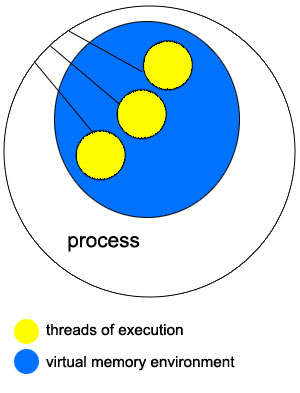
Each user program has an execution environment known as process. The term process is also used to refer to the executable form of a program. Each process has, at the minimum, one thread of execution.

User threads created inside the process are visible to the kernel. The execution context of a user thread is known as lightweight process, commonly abbreviated as LWP.

The kernel threads are executed by the kernel for tasks related to and needed by the kernel.

The execution state of a kernel thread is saved for later restoration when it is moved off the process for later scheduling.

Thanks to the virtual file system implementation in Solaris OS, we can configure multiple types of file systems at the same time.

As you can expect, complete support for IPv4 and IPv6 is implemented in the networking subsystem of the Solaris kernel.

The following types of loadable kernel modules are supported by the Solaris module framework:
  • file systems (UFS, NFS)
  • scheduler classes (Fixed Priority (FX), Real Time (RT) etc)
  • execute file format loaders
  • loadable system calls (semsys Semaphores)
  • streams modules
  • bus/device drivers (PCI)
  • other/miscellaneous modules (IPC)
Until Solaris 8, a library-level thread scheduler to maintain LWP threads had to be maintained in addition to the kernel thread scheduler. User threads were multiplexed into a pool of LWPs and that created issues with concurrency management and scheduling latency. " The scheduling latency was the effect of waiting for the threads library scheduler to link a user thread to an available LWP4. The concurrency issue has to do with maintaining a sufficient number of LWPs such that the process does not have runnable user threads waiting for an execution resource (an LWP)."

Solaris 8 introduced a single-level model for threads model. With the new single-level model, an LWP and kernel thread are created for each new user thread. The benefit of that is that the user thread always has a LWP and a kernel thread.

Thread applications link to libthread.so, typically placed in /usr/lib directory. On my Sun V210 with Solaris 10, the /usr/lib/libthread.so links to /lib/libthread.so.1

-bash-3.00$ ls -ltr /usr/lib/libthread.so
lrwxrwxrwx 1 root root 24 Mar 30 2005 /usr/lib/libthread.so -> ../../lib/libthread.so.1


If you are still using Solaris 8, the new binary based on single-level model is fully compatible with older model. Applications do not need to be recompiled to use the single-level model binary. On Solaris 8, all we need to do is point the runtime linker's path environmental variable to the new binary. On Solaris 10, the default library is the single-model one. The benefits of the new threads model include improved performance, scalability, and reliability, reliable signal behavior, improved adaptive mutex lock implementation and user-level sleep queues for synchronization objects4.

The scheduling classes in Solaris are TS (Timeshare), IA (interactive [enchanced TS]), FSS (fair-share scheduling), FX (fixed-priority), SYS (system), RT (real-time) and interrupts. The interrupts have the highest priority (160-169).

When you are using Windows, the IA schedule class is being used as it increases the thread priority for the window that has the focus.

Resources:
1. Linux Kernel Archives Provides the Linux kernel source and more
2. Monolithic kernels and micro-kernels
3. Monolithic kernel
4. Solaris Internals

MySQL: Replication stopped: Lock wait timeout exceeded

One of my slave servers stopped twice in the last couple of days. The error in the error log file was:

061214 21:17:41 [ERROR] Slave: Error 'Lock wait timeout exceeded; try restarting transaction' on query. Default database: 'fl_db1'. Query: 'UPDATE user SET total_photos = total_photos + 1 WHERE user_name = '666damy666'', Error_code: 1205
061214 21:17:41 [ERROR] Error running query, slave SQL thread aborted. Fix the problem, and restart the slave SQL thread with "SLAVE START". We stopped at log 'db2-bin.003509' position 342646547


I tried to learn more about the error code using perror and got
-bash-3.00$ perror 1205
Illegal error code: 1205


Information about the error is available on MySQL server error messages page of the manual.


Error: 1205 SQLSTATE: HY000 (ER_LOCK_WAIT_TIMEOUT)

Message: Lock wait timeout exceeded; try restarting transaction


The InnoDB error codes page lists the following information:

1205 (ER_LOCK_WAIT_TIMEOUT)

Lock wait timeout expired. Transaction was rolled back.


So how can we prevent that from happening?

This happens because the value of innodb_lock_wait_timeout was not enough for InnoDB to acquire the lock. On my servers it was set to default: 50.

The manual has following information:

The timeout in seconds an InnoDB transaction may wait for a lock before being rolled back. InnoDB automatically detects transaction deadlocks in its own lock table and rolls back the transaction. Beginning with MySQL 4.0.20 and 4.1.2, InnoDB notices locks set using the LOCK TABLES statement. Before that, if you use the LOCK TABLES statement, or other transaction-safe storage engines than InnoDB in the same transaction, a deadlock may arise that InnoDB cannot notice. In cases like this, the timeout is useful to resolve the situation. The default is 50 seconds.


I am going to investigate reasons behind the lock wait timeout exceeding. For now, let's see if increasing innodb_lock_wait_timeout to 120 will be enough on this slave server.

Unfortunately, we need to restart the server for the new values to take effect.

Thursday, December 14, 2006

Managing MySQL on Solaris 10: Part 1: Introduction

From time to time I receive requests from friends who are interested in learning more about managing MySQL on Solaris 10. To help them (and myself), I am planning to write about the internals of both MySQL and Solaris.

So if you have any questions that relate to adminstering and managing MySQL on Solaris, post them as comment, and though I don't promise, I will do my best to answer them.

What I usually recommend my friends is that they should start learning by finding a good authoritative book. In my opinion, reading one good authoritative book on the subject is better than reading three normal books.

BTW, I used to spend a lot of time finding the right book before buying it. Earlier this year I signed up for Safari Books Online (by O'reilly). My membership gave me a ten slot bookshelf. I really liked the service so I decided to get unlimited access to the books.

One of the books I highly recommend on Solaris is Solaris Internals: Solaris 10 and OpenSolaris Kernel Architecture, Second Edition. It is written by Jim Mauro and Richard McDougall. Community authors for the book include Frank Batschulat (UFS), Russell Blaine, Jeff Bonwick (ZFS) and Bryan Cantrill (DTrace) among many others.

On the MySQL side, the book on the top of my "to-recommend-list" is Pro MySQL by none other than Jay Pipes and Michael Kruckenberg (they both are my friends but that's NOT the reason I am recommending it). Seriously, if you are planning to buy one good authoritative book, buy this one.

Solaris 2.0 was released in 1992. Today, it is one of the leading operating systems offering reliability, performance, scalability, observability and more.

To get the latest information on Solaris, you can look at What's New on http://docs.sun.com/app/docs. On the docs site you can also access a variety of guides. For instance, you can get the Solaris 10 System Administrator Collection.

Solaris ZFS Administration Guide provides information for both SPARC and x86 (64-bit and 32-bit x86 compatible) based systems. This guide will help you in setting up and managing Solaris ZFS file systems.

In case you are wondering what is ZFS, I will let the guide provide the introduction:
"The Solaris ZFS file system is a revolutionary new file system that fundamentally changes the way file systems are administered, with features and benefits not found in any other file system available today. ZFS has been designed to be robust, scalable, and simple to administer."
ZFS, a transactional file system, manages the physical storage using a concept known as storage pools. Using the volume manager you can get the image of a single device and still take advantage of multiple devices.

One cool thing about Solaris is that each new release contains features found in old releases, however new releases may no longer support older hardware.

Solaris 10, a volume production operating system, does not support 32-bit SPARC processors. It doesn't support UltraSPARC I processor either. Solaris 10 only has a 64-bit release which can run on SPARC systems that use UltraSPARC II, UltraSPARC III, or UltraSPARC IV processors. You don't need to worry about 32-bit SPARC programs and applications as they can run without any issue on Solaris 10 64-bit kernel.

A lot of cool and innovative work has been done on Solaris 10. As a result it offers predictive self-healing, Service Management Framework (SMF), Fault Manager, Zones, Dynamic resource pools (DRP), physical memory control, dynamic tracing (DTrace), process rights management and much, much more. More documentation on what's new in Solaris 10 is available online. At the time of writing this post, there have been four Solaris 10 releases: 3/05, 1/06, 6/06 and 11/06.

Like every other DBA, I need a wide variety of tools for monitoring and analyzing system and application performance. On Solaris I get a variety of tools. Some of the tools that come very handy at times include vmstat (virtual memory statistics), mpstat (per-processor statistics), iostat (I/O statistics), netstat (network status), sar (system activity reporter), ptools (process tools), cpustat (CPU performance statistics), busstat (bus-related performance statistics), mdb (modular debugger), prstat (process statistics), truss (trace system calls and signals), apptrace (traces application function calls to Solaris shared libraries) and DTrace.

Solaris 10 has a 64-bit kernel and features process address space. That allows it to deliver a LP64 environment for execution. Long and pointer data types on it are 64 bits wide.

On Solaris 10, thanks to the modular binary kernel, kernel compilations aren't required when kernel parameters are changed or new functionality is added.

Threads can interupt threads that are of lower-priority if they need to run.

Wednesday, December 06, 2006

Changing character set from latin1 to utf8: Alter table vs. dump and import

Chat log with kimseong on #mysql regarding character sets.
 when you dump data in a latin1 table with MySQL, is it converted by default to utf8?
FrankMash: mysqldump? yes it is, but there are options to set it to latin1
kimseong: thanks. I have a table in latin1 that I am planning to dump and then change one field in its structure to be utf8
kimseong: should I dump data in utf8 (default) or specify (latin1) to preserve special chars
FrankMash: alter table can change directly, no need to dump, but backup first anyway
alter table does takes longer than dump/importing in our test
FrankMash: if you data is really stored as latin1, then it does not matter
FrankMash: it gets tricky if data is stored as utf8 in latin1 column
kimseong: thanks. so upon re-importing the data (assuming dump is utf8) will the characters be converted back to the charset specified in the table definition
yes
kimseong: yes that would be tricky. thank you :)

MySQL: Alter table vs. dump / load

Quick question: If one dumps a table (latin1) and then changes the charset of one of the fields to utf8 and then load the dump back, will the result be different than if one had used alter table to convert a field's charset?

Friday, December 01, 2006

relay_log_space_limit stopped working after replication reset?

I recently reset replication on one of my servers and since then my relay_log_space_limit=8G setting has stopped working since the relay log files continue to grow beyond the 8G limit (currently 15G).

Has anyone else experienced this before? Why would it suddenly stop honoring the relay log space limit?

Sunday, November 19, 2006

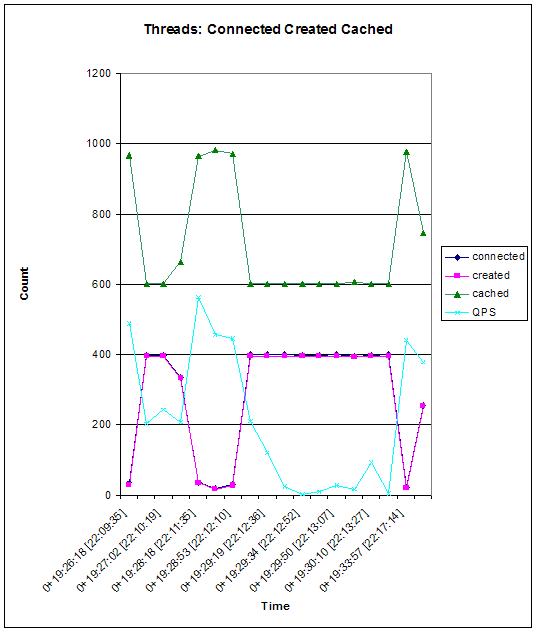
What's wrong with this graph?

So I am currently working on a MySQL server that is showing behavior as depicted in the following graph.


There can be several possible reasons for these sudden drops. I am working on the issue and will be posting the results. Have you experienced something similar?

Is the Query Cache hurting you?

If you are using memcached, you may want to check your query cache hits : cache inserts ratio. On one of my servers I inherited this ratio was 0.35 indicating that having the query cache turned on was actually harmful. I believe at the very least you need to have a ratio of 1. I was chatting with Sheeri and we both were of the opinion that a ratio of 90 was a very healthy ratio. By turning query cache off by default, we can then selectively cache the queries we need.

Later when I was talking to Ronald, he said he really wanted to be able to query the query cache to see what queries are cached. If will indeed be really cool to see that implemented.

So since turning the query cache off, I have been witnessing more throughput as less resources are being spent to maintain the inserts to query cache (which wasn't being effectively used at all).

I wanted to make all of these a little bit more detailed posts but have so little time. However I did want to post something to may be, expand upon, later. Your comments, questions are welcome and appreciated.

MySQL Camp: Good Time Flies Fast

It's really hard for me to believe how time has just been flying. Ever since I got back from the very awesome MySQL Camp at Google headquarters, I have been planning to write about it but for one reason or another, I couldn't.

Short version is that I had a great time at the MySQL Camp. I got to meet a lot of new and old friends. It was like a dream come true to hang out with everyone. Very special thanks to everyone I met at the conference as I had some very good discussions. Also thanks to:

Kevin Burton of TailRank for his idea
Jay Pipes for his intense hard work to make this event a big success
Leslie "Hacker Herder" Hawthorn, Mickey, Kynan, Chris and others for their excellent hospitality
Jeremy Cole and Eric Bergen of Proven Scaling for the plentiful, unending supply of beer
Brian Aker, Mårten Mickos, Michael "Monty" Widenius, David Axmark, Zack Urlocker, Ken Jacobs for just being there :)
Google for being an excellent host of this first camp and providing gourmet food and T-Shirts
MySQL for making the event possible
everyone for hanging out at the Tied House

I also got to hangout with Sheeri Kritzer, Baron Schwartz, Kaj Arnö, Kevin Burton, Dathan Pattishall and many other cool people.


There were so many cool sessions at the camp. Ronald Bradford has many good blog posts about the happenings of MySQL Camp at Google. I will write more about this as I get some time.

Overall, something that I would definitely love to attend next time.

Friday, November 10, 2006

Tools from Google

Chip Turner is giving a presentation on some of the tools used by Google.
[root@srv31 ~]# mkdir /google
[root@srv31 ~]# cd /google/
[root@srv31 google]# svn checkout http://google-mysql-tools.googlecode.com/svn/t runk/ google-mysql-tools
A google-mysql-tools/compat_logging.py
A google-mysql-tools/compact_innodb.py
A google-mysql-tools/compat_flags.py
A google-mysql-tools/thread_pool.py
A google-mysql-tools/COPYING
A google-mysql-tools/mypgrep.py
A google-mysql-tools/config_helper.py
A google-mysql-tools/dbspec_lib.py
A google-mysql-tools/command_pool.py
Checked out revision 2.


Tools that people keep re-writing.

All the code is in Python and released under Apache license.

mypgrep (mytop + grep)

If you have more than 5 dbs then it gets kinda difficult to monitor.
Find queries coming from certain IPs etc.

compactinoodb: deals with fragmentation. 20% to 30% increase in speeds becuase the data gets sequential. Must be done offline. Do it on replica and fail-over to replica. If using one large tablespace file instead of per table tablespace then also you can gain performance.

How often do you fragment? Not too often. It depends on how often you use drop table or deletes.

Another way: Change table to MyISAM and then to InnoDB. But this cannot be done on separate servers. You can kill the dump and import. Killing the alter can be bad.

OPTIMIZE/ANALYZE doesn't free up space. It does defragment but doesn't

Google running 4.0 in a lot of places and "cannot use tablespace per table" in all cases.

ERIC: Check how busy disk is compared to QPS and then decide whether to OPTIMIZE.

mod_ndb: REST Web Services API for MySQL

I am sitting in JD Duncan's session "Introducing mod_ndb, a REST Web Services API for MySQL Cluster" as it is really interesting. I kind of wanted to attend the SolidDB storage engine session and the community session happening concurrently, but the mod_ndb stuff is pretty cool.

I am going to try to get the presentation files hopefully from JD.

In case you are wondering, NDB = Network Database.

The HTTP Database uses HTTP instead of SQL. He is planning to create a good HTTP database in the future.

How to get mod_ndb:

(If you are at Google) http://192.168.22.214/code
otherwise: jdd at mysql dot com

Random Notes:

If you are a "PHP shop" its beneficial to use multithreading.

"sort merge join is better than nested loop join"

YouTube uses "Suse" and mostly InnoDB.

Investigate IO issues with SAN.

"recompile memcache to store BLOBs"

Memcache storage engine?

"Falcon is all about row cache"

At Google's Headquarters

Like everyone else, I am very excited to be at Google headquarters attending MySQL Camp. There are more than 200 attendees at the camp, which is really exciting. During the last couple of days, the number participants literally doubled. Folks from YouTube, Google, Yahoo and of course MySQL are all here.

So far I have met Jay Pipes, Jeremy Cole, Eric Bergen, Paul Tuckfield (YouTube and PayPal:paul at tuckfield), Kaj Arno and Sheeri Kritzer. Can't wait to meet others. Will be posting details soon.

Oh, and yes, we got Google T-shirts. Yay!

Also, not to forget, Ronald was introduced as Roland. Funny!

Wednesday, November 01, 2006

Going to MySQL Camp

So November has started and I am really excited to be going to the MySQL Camp. It will be great to finally see everyone again. In other exciting news, Ronald Bradford is coming to New York, Yay!

I will get to Mountain View on Thursday night and will also be renting a car. Jay Pipes and Ronald have already made a "call for free ride" however if you are still looking for a ride, feel free to message me. Since Jay Pipes is hanging out at the airport for sometime on Thursday, I will try to give him some company.

I will be staying at Best Western, Mountain View.

As has been pointed earlier, you do need to register for the camp (FREE) for security reasons. I sent my registration last week.

The Participants page has been updated by someone (Jay probably) to show who is registered. You can now add your name there along with the extra information needed.

PS: On the MySQL Camp home page, the link to the Participants page is broken. I tried to edit it to correct the link but got the message:

This page is locked. Only administrators and moderators may edit it.
If someone with appropriate permissions to the Wiki reads this, can we please correct the link. It currently points to http://mysqlcamp.org/%3Cb%3EParticipants%3C/b%3E instead of http://mysqlcamp.org/Participants

Wednesday, October 11, 2006

MySQL Benchmarking 4: Compiling Super-Smack on Solaris 10

I hate to start the blog post with the same "I've been really busy excuse" but honestly that's the truth. Ever since I wrote the last post, one important thing happened to me. My dentist prescribed me a mouth wash and it turned out that I was severely allergic to it. My upper lip became extremely swollen and remained like that for couple of days until I got a shot of steroid. Ughh, it was really painful. Anyways, time has just been flying by and I have a lot of catching up to do.

This is the part 4 of MySQL Benchmarking series. In the last post I showed you how you can compile Sysbench on Solaris 10. In this post, I will be showing you how you can compile Super-Smack on Solaris 10.

MySQL Super Smack was originally developed by Sasha Pachev (sasha at surveypro dot com), a former MySQL employee. After Sasha, Jeremy Zawodny of Yahoo! took over the maintenance of Super Smack. When Jeremey got really busy with Yahoo! stuff, Tony Bourke took over the Super Smack project.

Getting Super Smack to compile on Solaris 10 was really a headache even though a Sun blog post claimed it wasn't. Nonetheless, I finally succeeded with the help of Andy.

Download Super Smack source (the current version is 1.3).
wget http://vegan.net/tony/supersmack/super-smack-1.3.tar.gz


Navigate to the directory and then uncompress and extract the software
gunzip super-smack-1.3.tar.gz

tar -xf super-smack-1.3.tar


Now set your environment as follows.
LDFLAGS=-lsocket -lnsl -lm
LD_LIBRARY_PATH=/usr/local/mysql/lib:/usr/ccs/lib:/usr/lib:/usr/local/lib:/lib:/usr/ucblib
PATH=/usr/bin:/usr/sbin:/usr/sfw/bin:/usr/ccs/bin:/opt/SUNWspro/bin:/usr/sbin:/usr/bin:/usr/local/bin:.:/usr/ccs/bin:/usr/local/mysql/bin
CXX=/usr/local/bin/g++
CFLAGS=-xarch=v9
CC=/opt/SUNWspro/bin/cc
CXXFLAGS=-m64

Depending on your compiler you may need the following instead
CFLAGS=-m64


Before continuing, ensure you have SUNWflexlex installed and /usr/sfw/bin in your path.

Next step is to run configure

[root@db:/home/fmashraqi/install/bench/super-smack-1.3] ./configure --with-mysql
checking for a BSD-compatible install... ./install-sh -c
checking whether build environment is sane... yes
checking whether make sets $(MAKE)... yes
checking for working aclocal... missing
checking for working autoconf... missing
checking for working automake... missing
checking for working autoheader... missing
checking for working makeinfo... missing
checking for sh... /bin/bash
checking for gcc... /opt/SUNWspro/bin/cc
checking for C compiler default output file name... a.out
checking whether the C compiler works... yes
checking whether we are cross compiling... no
checking for suffix of executables...
checking for suffix of object files... o
checking whether we are using the GNU C compiler... no
checking whether /opt/SUNWspro/bin/cc accepts -g... yes
checking for /opt/SUNWspro/bin/cc option to accept ANSI C... none needed
checking whether we are using the GNU C++ compiler... yes
checking whether /usr/local/bin/g++ accepts -g... yes
checking how to run the C preprocessor... /opt/SUNWspro/bin/cc -E
checking for a BSD-compatible install... ./install-sh -c
checking whether ln -s works... yes
checking for flex... flex
checking for flex... (cached) flex
checking for yywrap in -lfl... no
checking for yywrap in -ll... yes
checking lex output file root... lex.yy
checking whether yytext is a pointer... yes
checking for bison... no
checking for byacc... no
checking for compress in -lz... yes
checking for crypt in -lcrypt... yes
checking for crypt... yes
checking for libmysqlclient...
checking for mysql_real_connect in -lmysqlclient... yes
checking for mysql.h...
checking for egrep... egrep
checking for ANSI C header files... yes
checking for sys/types.h... yes
checking for sys/stat.h... yes
checking for stdlib.h... yes
checking for string.h... yes
checking for memory.h... yes
checking for strings.h... yes
checking for inttypes.h... yes
checking for stdint.h... yes
checking for unistd.h... yes
checking sys/time.h usability... yes
checking sys/time.h presence... yes
checking for sys/time.h... yes
checking for unistd.h... (cached) yes
checking whether time.h and sys/time.h may both be included... yes
checking return type of signal handlers... void
checking for gettimeofday... yes
checking for strerror... yes
configure: creating ./config.status
config.status: creating Makefile
config.status: creating src/Makefile
config.status: creating config.h
config.status: executing default-1 commands

Building with the following options:

MySQL Support..................... yes
PostgreSQL Support................ no
Oracle Support.................... no

If this is not what you intended, please re-run configure.

Thanks for using super-smack!


Now edit the src/Makefile and add
-lsocket -lnsl

to
LIBS = -L/usr/local/mysql/lib -lcrypt -lz  -lsocket -lnsl


Now run make. It will fail.

make  all-recursive
Making all in src
/usr/local/bin/g++ -DHAVE_CONFIG_H -I. -I. -I..
-I/usr/local/mysql/include -m64 -c super-smack.cc
/usr/local/bin/g++ -DHAVE_CONFIG_H -I. -I. -I..
-I/usr/local/mysql/include -m64 -c client.cc
/usr/local/bin/g++ -DHAVE_CONFIG_H -I. -I. -I..
-I/usr/local/mysql/include -m64 -c engines.cc
/usr/local/bin/g++ -DHAVE_CONFIG_H -I. -I. -I..
-I/usr/local/mysql/include -m64 -c die.cc
/usr/local/bin/g++ -DHAVE_CONFIG_H -I. -I. -I..
-I/usr/local/mysql/include -m64 -c dictionary.cc
yacc -d super-smack-yacc.yy && mv y.tab.c super-smack-yacc.cc
if test -f y.tab.h; then if cmp -s y.tab.h super-smack-yacc.h; then rm -f y.tab.h; else mv
y.tab.h super-smack-yacc.h; fi; else :; fi
/usr/local/bin/g++ -DHAVE_CONFIG_H -I. -I. -I..
-I/usr/local/mysql/include -m64 -c super-smack-yacc.cc
flex super-smack-lex.ll && mv lex.yy.c super-smack-lex.cc
/usr/local/bin/g++ -DHAVE_CONFIG_H -I. -I. -I..
-I/usr/local/mysql/include -m64 -c super-smack-lex.cc
/usr/local/bin/g++ -DHAVE_CONFIG_H -I. -I. -I..
-I/usr/local/mysql/include -m64 -c query.cc
query.cc: In member function `void Query_report::fd_send(int)':
query.cc:200: warning: cast from pointer to integer of different size
query.cc:219: warning: cast from pointer to integer of different size
/usr/local/bin/g++ -DHAVE_CONFIG_H -I. -I. -I..
-I/usr/local/mysql/include -m64 -c parse.cc
/usr/local/bin/g++ -DHAVE_CONFIG_H -I. -I. -I..
-I/usr/local/mysql/include -m64 -c libsmack.cc
/usr/local/bin/g++ -DHAVE_CONFIG_H -I. -I. -I..
-I/usr/local/mysql/include -m64 -c mysql-client.cc
/usr/local/bin/g++ -DHAVE_CONFIG_H -I. -I. -I..
-I/usr/local/mysql/include -m64 -c pg-client.cc
/usr/local/bin/g++ -DHAVE_CONFIG_H -I. -I. -I..
-I/usr/local/mysql/include -m64 -c ora-client.cc
/usr/local/bin/g++ -DHAVE_CONFIG_H -I. -I. -I..
-I/usr/local/mysql/include -m64 -c tcp_client.cc
In file included from tcp_client.cc:2:
tcp_client.h: In member function `TcpClient::operator void*()':
tcp_client.h:58: warning: cast to pointer from integer of different
size
/usr/local/bin/g++ -m64 -lsocket -lnsl -lm -o super-smack
super-smack.o client.o engines.o die.o dictionary.o
super-smack-yacc.o super-smack-lex.o query.o parse.o libsmack.o
mysql-client.o pg-client.o ora-client.o tcp_client.o
-L/usr/local/mysql/lib -lmysqlclient -L/usr/local/mysql/lib -lcrypt
-lz -lsocket -lnsl
Undefined first referenced
symbol in file
yyerror(char const*) super-smack-yacc.o
ld: fatal: Symbol referencing errors. No output written to
super-smack
collect2: ld returned 1 exit status
*** Error code 1
make: Fatal error: Command failed for target `super-smack'
Current working directory
/home/fmashraqi/install/bench/super-smack-1.3/src
*** Error code 1
The following command caused the error:
set fnord ; amf=$2; dot_seen=no; target=`echo all-recursive | sed s/-recursive//`; list='src'; for subdir in $list; do echo "Making $target in $subdir"; if test "$subdir" = "."; then dot_seen=yes; local_target="$target-am"; else local_target="$target"; fi; (cd $subdir && make $local_target) || case "$amf" in *=*) exit 1;; *k*) fail=yes;; *) exit 1;; esac;
done; if test "$dot_seen" = "no"; then make "$target-am" || exit 1; fi; test -z "$fail"
make: Fatal error: Command failed for target `all-recursive'
Current working directory
/home/fmashraqi/install/bench/super-smack-1.3
*** Error code 1
make: Fatal error: Command failed for target `all-recursive-am'


When it does fail, edit the following line (around 107) of super-smack-yacc.cc and search for
YYCONST
and remove it.

Before:
void yyerror(YYCONST char *);


End:
void yyerror(char *);


Then run make again and then make install.

Running make:

make  all-recursive
Making all in src
/usr/local/bin/g++ -DHAVE_CONFIG_H -I. -I. -I..
-I/usr/local/mysql/include -m64 -c super-smack-yacc.cc
/usr/local/bin/g++ -m64 -lsocket -lnsl -lm -o super-smack
super-smack.o client.o engines.o die.o dictionary.o
super-smack-yacc.o super-smack-lex.o query.o parse.o libsmack.o
mysql-client.o pg-client.o ora-client.o tcp_client.o
-L/usr/local/mysql/lib -lmysqlclient -L/usr/local/mysql/lib -lcrypt
-lz -lsocket -lnsl
/usr/local/bin/g++ -DHAVE_CONFIG_H -I. -I. -I..
-I/usr/local/mysql/include -m64 -c gen-data.cc
/usr/local/bin/g++ -m64 -lsocket -lnsl -lm -o gen-data gen-data.o
die.o -L/usr/local/mysql/lib -lcrypt -lz -lsocket -lnsl
/usr/local/bin/g++ -DHAVE_CONFIG_H -I. -I. -I..
-I/usr/local/mysql/include -m64 -c test-dictionary.cc
/usr/local/bin/g++ -m64 -lsocket -lnsl -lm -o test-dictionary
test-dictionary.o dictionary.o die.o libsmack.o
-L/usr/local/mysql/lib -lcrypt -lz -lsocket -lnsl
/usr/local/bin/g++ -DHAVE_CONFIG_H -I. -I. -I..
-I/usr/local/mysql/include -m64 -c test-client.cc
/usr/local/bin/g++ -m64 -lsocket -lnsl -lm -o test-client
test-client.o client.o engines.o die.o dictionary.o query.o
libsmack.o mysql-client.o pg-client.o ora-client.o
-L/usr/local/mysql/lib -lmysqlclient -L/usr/local/mysql/lib -lcrypt
-lz -lsocket -lnsl
/usr/local/bin/g++ -DHAVE_CONFIG_H -I. -I. -I..
-I/usr/local/mysql/include -m64 -c test_tcp_client.cc
In file included from test_tcp_client.cc:1:
tcp_client.h: In member function `TcpClient::operator void*()':
tcp_client.h:58: warning: cast to pointer from integer of different
size
/usr/local/bin/g++ -m64 -lsocket -lnsl -lm -o test_tcp_client
test_tcp_client.o tcp_client.o -L/usr/local/mysql/lib -lcrypt -lz
-lsocket -lnsl


Now run make install
Making install in src
/bin/bash ../mkinstalldirs /usr/local/bin
.././install-sh -c super-smack /usr/local/bin/super-smack
.././install-sh -c gen-data /usr/local/bin/gen-data
/bin/bash ./mkinstalldirs /usr/share/smacks /var/smack-data
cp -rp ./smacks/* /usr/share/smacks


Super Smack should build compile fine now. However when you will try to run it, you will get "wrong ELFClass errors"

$ super-smack
ld.so.1: super-smack: fatal: /usr/local/lib/libstdc++.so.5: wrong ELF
class: ELFCLASS32
Killed


This is because of a 32 bit libstdc++.so being used

[root@db:/home/fmashraqi/install/bench/super-smack-1.3] file /usr/local/bin/super-smack
/usr/local/bin/super-smack: ELF 64-bit MSB executable SPARCV9 Version 1, dynamically linked, not stripped
[root@db:/home/fmashraqi/install/bench/super-smack-1.3] file /usr/local/lib/libstdc++.so
/usr/local/lib/libstdc++.so: ELF 32-bit MSB dynamic lib SPARC Version 1, dynamically linked, not stripped


To correct the error, we need to use an alternative 64-bit libstdc++.so
crle -64 -u -l /usr/local/lib/sparcv9


on your system this may be (but the above worked for me)
crle -64 -u -l /usr/sfw/lib/sparcv9


You can also try modifying LIBS environment variable to avoid the above crle stuff.

LIBS=-R/usr/sfw/lib/sparcv9 -R/usr/local/mysql/lib -lnsl -lsocket


At this point Super Smack should be working.

Stay tuned as in future we will be putting all these tools to some good use.

Friday, September 22, 2006

[ERROR] Slave I/O thread: Failed reading log event, reconnecting to retry,

So lately this error message has been appearing more and more in the log files of my slaves

060524 17:45:45 [ERROR] Error reading packet from server: Lost connection to MySQL server during query (server_errno=2013)
060801 9:42:13 [ERROR] Error reading packet from server: Lost connection to MySQL server during query (server_errno=2013)
060801 13:33:41 [ERROR] Error reading packet from server: Lost connection to MySQL server during query (server_errno=2013)
060801 20:41:30 [ERROR] Error reading packet from server: Lost connection to MySQL server during query (server_errno=2013)
060802 2:28:21 [ERROR] Error reading packet from server: Lost connection to MySQL server during query (server_errno=2013)
060802 3:46:29 [ERROR] Error reading packet from server: Lost connection to MySQL server during query (server_errno=2013)
060802 3:48:47 [ERROR] Error reading packet from server: Lost connection to MySQL server during query (server_errno=2013)
060802 5:02:53 [ERROR] Error reading packet from server: Lost connection to MySQL server during query (server_errno=2013)
060802 6:25:57 [ERROR] Error reading packet from server: Lost connection to MySQL server during query (server_errno=2013)
060901 21:58:11 [ERROR] Error reading packet from server: Lost connection to MySQL server during query (server_errno=2013)
060902 2:20:46 [ERROR] Error reading packet from server: Lost connection to MySQL server during query (server_errno=2013)
060902 2:53:30 [ERROR] Error reading packet from server: Lost connection to MySQL server during query (server_errno=2013)
060903 11:37:36 [ERROR] Error reading packet from server: Lost connection to MySQL server during query (server_errno=2013)
060903 18:58:28 [ERROR] Error reading packet from server: Lost connection to MySQL server during query (server_errno=2013)
060903 21:35:54 [ERROR] Error reading packet from server: Lost connection to MySQL server during query (server_errno=2013)
060904 23:23:12 [ERROR] Error reading packet from server: Lost connection to MySQL server during query (server_errno=2013)
060905 1:55:37 [ERROR] Error reading packet from server: Lost connection to MySQL server during query (server_errno=2013)
060906 1:52:49 [ERROR] Error reading packet from server: Lost connection to MySQL server during query (server_errno=2013)
060906 3:35:50 [ERROR] Error reading packet from server: Lost connection to MySQL server during query (server_errno=2013)
060906 3:55:13 [ERROR] Error reading packet from server: Lost connection to MySQL server during query (server_errno=2013)
060906 9:15:55 [ERROR] Error reading packet from server: Lost connection to MySQL server during query (server_errno=2013)
060907 0:16:43 [ERROR] Error reading packet from server: Lost connection to MySQL server during query (server_errno=2013)
060907 6:25:03 [ERROR] Error reading packet from server: Lost connection to MySQL server during query (server_errno=2013)
060907 7:00:45 [ERROR] Error reading packet from server: Lost connection to MySQL server during query (server_errno=2013)
060907 7:10:20 [ERROR] Error reading packet from server: Lost connection to MySQL server during query (server_errno=2013)
060907 7:25:40 [ERROR] Error reading packet from server: Lost connection to MySQL server during query (server_errno=2013)
060914 8:31:23 [ERROR] Error reading packet from server: Lost connection to MySQL server during query (server_errno=2013)
060914 14:07:42 [ERROR] Error reading packet from server: Lost connection to MySQL server during query (server_errno=2013)
060914 15:26:54 [ERROR] Error reading packet from server: Lost connection to MySQL server during query (server_errno=2013)
060914 15:44:04 [ERROR] Error reading packet from server: Lost connection to MySQL server during query (server_errno=2013)
060914 17:02:23 [ERROR] Error reading packet from server: Lost connection to MySQL server during query (server_errno=2013)
060914 19:34:36 [ERROR] Error reading packet from server: Lost connection to MySQL server during query (server_errno=2013)
060915 1:16:43 [ERROR] Error reading packet from server: Lost connection to MySQL server during query (server_errno=2013)
060915 6:23:26 [ERROR] Error reading packet from server: Lost connection to MySQL server during query (server_errno=2013)
060915 15:10:09 [ERROR] Error reading packet from server: Lost connection to MySQL server during query (server_errno=2013)
060915 23:31:01 [ERROR] Error reading packet from server: Lost connection to MySQL server during query (server_errno=2013)
060916 0:34:22 [ERROR] Error reading packet from server: Lost connection to MySQL server during query (server_errno=2013)
060916 0:53:07 [ERROR] Error reading packet from server: Lost connection to MySQL server during query (server_errno=2013)
060916 1:18:46 [ERROR] Error reading packet from server: Lost connection to MySQL server during query (server_errno=2013)
060916 2:14:17 [ERROR] Error reading packet from server: Lost connection to MySQL server during query (server_errno=2013)
060916 3:09:49 [ERROR] Error reading packet from server: Lost connection to MySQL server during query (server_errno=2013)
060916 5:31:41 [ERROR] Error reading packet from server: Lost connection to MySQL server during query (server_errno=2013)
060916 8:16:14 [ERROR] Error reading packet from server: Lost connection to MySQL server during query (server_errno=2013)
060916 19:14:32 [ERROR] Error reading packet from server: Lost connection to MySQL server during query (server_errno=2013)
060917 4:31:30 [ERROR] Error reading packet from server: Lost connection to MySQL server during query (server_errno=2013)
060917 5:09:30 [ERROR] Error reading packet from server: Lost connection to MySQL server during query (server_errno=2013)
060917 5:42:54 [ERROR] Error reading packet from server: Lost connection to MySQL server during query (server_errno=2013)
060917 5:59:50 [ERROR] Error reading packet from server: Lost connection to MySQL server during query (server_errno=2013)
060917 6:19:29 [ERROR] Error reading packet from server: Lost connection to MySQL server during query (server_errno=2013)
060917 6:51:12 [ERROR] Error reading packet from server: Lost connection to MySQL server during query (server_errno=2013)
060917 7:28:21 [ERROR] Error reading packet from server: Lost connection to MySQL server during query (server_errno=2013)
060917 9:11:02 [ERROR] Error reading packet from server: Lost connection to MySQL server during query (server_errno=2013)
060917 17:12:12 [ERROR] Error reading packet from server: Lost connection to MySQL server during query (server_errno=2013)
060918 1:32:13 [ERROR] Error reading packet from server: Lost connection to MySQL server during query (server_errno=2013)
060918 6:22:10 [ERROR] Error reading packet from server: Lost connection to MySQL server during query (server_errno=2013)
060918 7:57:29 [ERROR] Error reading packet from server: Lost connection to MySQL server during query (server_errno=2013)
060918 8:15:41 [ERROR] Error reading packet from server: Lost connection to MySQL server during query (server_errno=2013)
060918 8:29:47 [ERROR] Error reading packet from server: Lost connection to MySQL server during query (server_errno=2013)
060918 8:57:13 [ERROR] Error reading packet from server: Lost connection to MySQL server during query (server_errno=2013)
060918 9:22:59 [ERROR] Error reading packet from server: Lost connection to MySQL server during query (server_errno=2013)
060918 10:17:37 [ERROR] Error reading packet from server: Lost connection to MySQL server during query (server_errno=2013)
060918 16:56:22 [ERROR] Error reading packet from server: Lost connection to MySQL server during query (server_errno=2013)
060919 3:28:49 [ERROR] Error reading packet from server: Lost connection to MySQL server during query (server_errno=2013)
060919 6:44:39 [ERROR] Error reading packet from server: Lost connection to MySQL server during query (server_errno=2013)
060919 9:13:49 [ERROR] Error reading packet from server: Lost connection to MySQL server during query (server_errno=2013)
060919 10:45:18 [ERROR] Error reading packet from server: Lost connection to MySQL server during query (server_errno=2013)
060919 11:19:04 [ERROR] Error reading packet from server: Lost connection to MySQL server during query (server_errno=2013)
060919 11:43:34 [ERROR] Error reading packet from server: Lost connection to MySQL server during query (server_errno=2013)
060919 12:44:05 [ERROR] Error reading packet from server: Lost connection to MySQL server during query (server_errno=2013)
060919 13:51:59 [ERROR] Error reading packet from server: Lost connection to MySQL server during query (server_errno=2013)
060919 17:42:23 [ERROR] Error reading packet from server: Lost connection to MySQL server during query (server_errno=2013)
060920 2:21:19 [ERROR] Error reading packet from server: Lost connection to MySQL server during query (server_errno=2013)
060920 6:07:38 [ERROR] Error reading packet from server: Lost connection to MySQL server during query (server_errno=2013)
060920 10:36:03 [ERROR] Error reading packet from server: Lost connection to MySQL server during query (server_errno=2013)
060920 16:39:58 [ERROR] Error reading packet from server: Lost connection to MySQL server during query (server_errno=2013)
060920 18:56:05 [ERROR] Error reading packet from server: Lost connection to MySQL server during query (server_errno=2013)
060920 19:57:34 [ERROR] Error reading packet from server: Lost connection to MySQL server during query (server_errno=2013)
060920 21:06:00 [ERROR] Error reading packet from server: Lost connection to MySQL server during query (server_errno=2013)
060920 22:43:42 [ERROR] Error reading packet from server: Lost connection to MySQL server during query (server_errno=2013)
060920 23:40:12 [ERROR] Error reading packet from server: Lost connection to MySQL server during query (server_errno=2013)
060921 1:57:11 [ERROR] Error reading packet from server: Lost connection to MySQL server during query (server_errno=2013)
060921 7:08:38 [ERROR] Error reading packet from server: Lost connection to MySQL server during query (server_errno=2013)
060921 12:53:20 [ERROR] Error reading packet from server: Lost connection to MySQL server during query (server_errno=2013)
060922 4:03:47 [ERROR] Error reading packet from server: Lost connection to MySQL server during query (server_errno=2013)
060922 5:04:55 [ERROR] Error reading packet from server: Lost connection to MySQL server during query (server_errno=2013)
060922 5:43:06 [ERROR] Error reading packet from server: Lost connection to MySQL server during query (server_errno=2013)
060922 6:14:05 [ERROR] Error reading packet from server: Lost connection to MySQL server during query (server_errno=2013)
060922 6:42:56 [ERROR] Error reading packet from server: Lost connection to MySQL server during query (server_errno=2013)
060922 7:37:25 [ERROR] Error reading packet from server: Lost connection to MySQL server during query (server_errno=2013)
060922 10:50:05 [ERROR] Error reading packet from server: Lost connection to MySQL server during query (server_errno=2013)


I have been investigating the reason for this. Matthew Lord suggested in this bug report that in at least some cases, this reconnection was expected due to the slave_net_timeout value, which on my server is set to default.

mysql> SHOW VARIABLES LIKE 'slave_net_timeout';
+-------------------+-------+
| Variable_name | Value |
+-------------------+-------+
| slave_net_timeout | 3600 |
+-------------------+-------+
1 row in set (0.00 sec)


Other timeout variables
mysql> SHOW VARIABLES LIKE '%timeout%';
+--------------------------+-------+
| Variable_name | Value |
+--------------------------+-------+
| connect_timeout | 15 |
| delayed_insert_timeout | 300 |
| innodb_lock_wait_timeout | 50 |
| interactive_timeout | 28800 |
| net_read_timeout | 30 |
| net_write_timeout | 60 |
| slave_net_timeout | 3600 |
| sync_replication_timeout | 0 |
| wait_timeout | 28800 |
+--------------------------+-------+
9 rows in set (0.00 sec)

Seeing the time when the above errors appeared, it is clear that in some cases the reconnection is occuring multiple times within an hour. This leads me to indicate that something else is going on here. One thing I noticed is that the reconnection is happening everytime slave switches to a new log file.
060524 17:45:45 [ERROR] Slave I/O thread: Failed reading log event, reconnecting to retry, log 'db2-bin.001628' position 587419455
060801 9:42:13 [ERROR] Slave I/O thread: Failed reading log event, reconnecting to retry, log 'db2-bin.002268' position 754471449
060801 13:33:41 [ERROR] Slave I/O thread: Failed reading log event, reconnecting to retry, log 'db2-bin.002269' position 318959997
060801 20:41:30 [ERROR] Slave I/O thread: Failed reading log event, reconnecting to retry, log 'db2-bin.002270' position 318856904
060802 2:28:21 [ERROR] Slave I/O thread: Failed reading log event, reconnecting to retry, log 'db2-bin.002271' position 318933307
060802 3:46:29 [ERROR] Slave I/O thread: Failed reading log event, reconnecting to retry, log 'db2-bin.002272' position 318843694
060802 3:48:47 [ERROR] Slave I/O thread: Failed reading log event, reconnecting to retry, log 'db2-bin.002272' position 716398470
060802 5:02:53 [ERROR] Slave I/O thread: Failed reading log event, reconnecting to retry, log 'db2-bin.002273' position 318901405
060802 6:25:57 [ERROR] Slave I/O thread: Failed reading log event, reconnecting to retry, log 'db2-bin.002274' position 318930542
060830 9:57:59 [ERROR] Slave I/O thread: Failed reading log event, reconnecting to retry, log 'db2-bin.002554' position 926355659
060901 21:58:11 [ERROR] Slave I/O thread: Failed reading log event, reconnecting to retry, log 'db2-bin.002580' position 1015598952
060902 2:20:46 [ERROR] Slave I/O thread: Failed reading log event, reconnecting to retry, log 'db2-bin.002581' position 1015599182
060902 2:53:30 [ERROR] Slave I/O thread: Failed reading log event, reconnecting to retry, log 'db2-bin.002582' position 1015592759
060903 11:37:36 [ERROR] Slave I/O thread: Failed reading log event, reconnecting to retry, log 'db2-bin.002595' position 544695514
060903 18:58:29 [ERROR] Slave I/O thread: Failed reading log event, reconnecting to retry, log 'db2-bin.002596' position 544696110
060903 21:35:54 [ERROR] Slave I/O thread: Failed reading log event, reconnecting to retry, log 'db2-bin.002597' position 544609673
060904 23:23:13 [ERROR] Slave I/O thread: Failed reading log event, reconnecting to retry, log 'db2-bin.002605' position 149900829
060905 1:55:37 [ERROR] Slave I/O thread: Failed reading log event, reconnecting to retry, log 'db2-bin.002606' position 149901053
060906 1:52:50 [ERROR] Slave I/O thread: Failed reading log event, reconnecting to retry, log 'db2-bin.002612' position 450457914
060906 3:35:50 [ERROR] Slave I/O thread: Failed reading log event, reconnecting to retry, log 'db2-bin.002613' position 450443729
060906 3:55:14 [ERROR] Slave I/O thread: Failed reading log event, reconnecting to retry, log 'db2-bin.002614' position 450459188
060906 9:15:55 [ERROR] Slave I/O thread: Failed reading log event, reconnecting to retry, log 'db2-bin.002615' position 238998569
060907 0:16:43 [ERROR] Slave I/O thread: Failed reading log event, reconnecting to retry, log 'db2-bin.002616' position 238969084
060907 6:25:03 [ERROR] Slave I/O thread: Failed reading log event, reconnecting to retry, log 'db2-bin.002617' position 238982702
060907 7:00:45 [ERROR] Slave I/O thread: Failed reading log event, reconnecting to retry, log 'db2-bin.002618' position 238992216
060907 7:10:20 [ERROR] Slave I/O thread: Failed reading log event, reconnecting to retry, log 'db2-bin.002619' position 238927275
060907 7:25:40 [ERROR] Slave I/O thread: Failed reading log event, reconnecting to retry, log 'db2-bin.002619' position 924791139
060914 8:31:23 [ERROR] Slave I/O thread: Failed reading log event, reconnecting to retry, log 'db2-bin.002677' position 908960062
060914 14:07:42 [ERROR] Slave I/O thread: Failed reading log event, reconnecting to retry, log 'db2-bin.002678' position 908904132
060914 15:26:55 [ERROR] Slave I/O thread: Failed reading log event, reconnecting to retry, log 'db2-bin.002679' position 908886495
060914 15:44:04 [ERROR] Slave I/O thread: Failed reading log event, reconnecting to retry, log 'db2-bin.002680' position 908915040
060914 17:02:23 [ERROR] Slave I/O thread: Failed reading log event, reconnecting to retry, log 'db2-bin.002681' position 192263658
060914 19:34:36 [ERROR] Slave I/O thread: Failed reading log event, reconnecting to retry, log 'db2-bin.002682' position 192288645
060915 1:16:44 [ERROR] Slave I/O thread: Failed reading log event, reconnecting to retry, log 'db2-bin.002683' position 192314960
060915 6:23:27 [ERROR] Slave I/O thread: Failed reading log event, reconnecting to retry, log 'db2-bin.002684' position 192313581
060915 15:10:09 [ERROR] Slave I/O thread: Failed reading log event, reconnecting to retry, log 'db2-bin.002685' position 192302436
060915 23:31:01 [ERROR] Slave I/O thread: Failed reading log event, reconnecting to retry, log 'db2-bin.002686' position 192257517
060916 0:34:22 [ERROR] Slave I/O thread: Failed reading log event, reconnecting to retry, log 'db2-bin.002687' position 192209960
060916 0:53:07 [ERROR] Slave I/O thread: Failed reading log event, reconnecting to retry, log 'db2-bin.002688' position 192330206
060916 1:18:47 [ERROR] Slave I/O thread: Failed reading log event, reconnecting to retry, log 'db2-bin.002688' position 968380500
060916 2:14:17 [ERROR] Slave I/O thread: Failed reading log event, reconnecting to retry, log 'db2-bin.002689' position 968393724
060916 3:09:49 [ERROR] Slave I/O thread: Failed reading log event, reconnecting to retry, log 'db2-bin.002690' position 968428073
060916 5:31:41 [ERROR] Slave I/O thread: Failed reading log event, reconnecting to retry, log 'db2-bin.002691' position 968448699
060916 8:16:14 [ERROR] Slave I/O thread: Failed reading log event, reconnecting to retry, log 'db2-bin.002692' position 968365497
060916 19:14:32 [ERROR] Slave I/O thread: Failed reading log event, reconnecting to retry, log 'db2-bin.002693' position 968446897
060917 4:31:30 [ERROR] Slave I/O thread: Failed reading log event, reconnecting to retry, log 'db2-bin.002694' position 968446979
060917 5:09:30 [ERROR] Slave I/O thread: Failed reading log event, reconnecting to retry, log 'db2-bin.002695' position 968399196
060917 5:42:54 [ERROR] Slave I/O thread: Failed reading log event, reconnecting to retry, log 'db2-bin.002696' position 192228405
060917 5:59:50 [ERROR] Slave I/O thread: Failed reading log event, reconnecting to retry, log 'db2-bin.002697' position 192266326
060917 6:19:29 [ERROR] Slave I/O thread: Failed reading log event, reconnecting to retry, log 'db2-bin.002698' position 192287578
060917 6:51:12 [ERROR] Slave I/O thread: Failed reading log event, reconnecting to retry, log 'db2-bin.002699' position 192233081
060917 7:28:21 [ERROR] Slave I/O thread: Failed reading log event, reconnecting to retry, log 'db2-bin.002700' position 192219086
060917 9:11:02 [ERROR] Slave I/O thread: Failed reading log event, reconnecting to retry, log 'db2-bin.002701' position 192225663
060917 17:12:12 [ERROR] Slave I/O thread: Failed reading log event, reconnecting to retry, log 'db2-bin.002702' position 192222395
060918 1:32:13 [ERROR] Slave I/O thread: Failed reading log event, reconnecting to retry, log 'db2-bin.002703' position 192232114
060918 6:22:10 [ERROR] Slave I/O thread: Failed reading log event, reconnecting to retry, log 'db2-bin.002703' position 968461872
060918 7:57:29 [ERROR] Slave I/O thread: Failed reading log event, reconnecting to retry, log 'db2-bin.002704' position 968442279
060918 8:15:41 [ERROR] Slave I/O thread: Failed reading log event, reconnecting to retry, log 'db2-bin.002705' position 968373031
060918 8:29:47 [ERROR] Slave I/O thread: Failed reading log event, reconnecting to retry, log 'db2-bin.002706' position 968440179
060918 8:57:13 [ERROR] Slave I/O thread: Failed reading log event, reconnecting to retry, log 'db2-bin.002707' position 968447052
060918 9:22:59 [ERROR] Slave I/O thread: Failed reading log event, reconnecting to retry, log 'db2-bin.002708' position 968443197
060918 10:17:37 [ERROR] Slave I/O thread: Failed reading log event, reconnecting to retry, log 'db2-bin.002709' position 968439668
060918 16:56:22 [ERROR] Slave I/O thread: Failed reading log event, reconnecting to retry, log 'db2-bin.002710' position 968438755
060919 3:28:49 [ERROR] Slave I/O thread: Failed reading log event, reconnecting to retry, log 'db2-bin.002711' position 968427682
060919 6:44:39 [ERROR] Slave I/O thread: Failed reading log event, reconnecting to retry, log 'db2-bin.002712' position 968444779
060919 9:13:49 [ERROR] Slave I/O thread: Failed reading log event, reconnecting to retry, log 'db2-bin.002713' position 968450077
060919 10:45:18 [ERROR] Slave I/O thread: Failed reading log event, reconnecting to retry, log 'db2-bin.002714' position 968435044
060919 11:19:04 [ERROR] Slave I/O thread: Failed reading log event, reconnecting to retry, log 'db2-bin.002715' position 968338956
060919 11:43:34 [ERROR] Slave I/O thread: Failed reading log event, reconnecting to retry, log 'db2-bin.002716' position 968432120
060919 12:44:05 [ERROR] Slave I/O thread: Failed reading log event, reconnecting to retry, log 'db2-bin.002717' position 968443215
060919 13:51:59 [ERROR] Slave I/O thread: Failed reading log event, reconnecting to retry, log 'db2-bin.002718' position 968443892
060919 17:42:23 [ERROR] Slave I/O thread: Failed reading log event, reconnecting to retry, log 'db2-bin.002719' position 968409684
060920 2:21:19 [ERROR] Slave I/O thread: Failed reading log event, reconnecting to retry, log 'db2-bin.002720' position 968436935
060920 6:07:38 [ERROR] Slave I/O thread: Failed reading log event, reconnecting to retry, log 'db2-bin.002721' position 968443697
060920 10:36:03 [ERROR] Slave I/O thread: Failed reading log event, reconnecting to retry, log 'db2-bin.002722' position 968397302
060920 16:39:58 [ERROR] Slave I/O thread: Failed reading log event, reconnecting to retry, log 'db2-bin.002723' position 968383643
060920 18:56:05 [ERROR] Slave I/O thread: Failed reading log event, reconnecting to retry, log 'db2-bin.002724' position 968437352
060920 19:57:34 [ERROR] Slave I/O thread: Failed reading log event, reconnecting to retry, log 'db2-bin.002725' position 968502168
060920 21:06:00 [ERROR] Slave I/O thread: Failed reading log event, reconnecting to retry, log 'db2-bin.002726' position 968409788
060920 22:43:42 [ERROR] Slave I/O thread: Failed reading log event, reconnecting to retry, log 'db2-bin.002727' position 968402634
060920 23:40:12 [ERROR] Slave I/O thread: Failed reading log event, reconnecting to retry, log 'db2-bin.002728' position 968390187
060921 1:57:11 [ERROR] Slave I/O thread: Failed reading log event, reconnecting to retry, log 'db2-bin.002729' position 968358219
060921 7:08:38 [ERROR] Slave I/O thread: Failed reading log event, reconnecting to retry, log 'db2-bin.002730' position 968442367
060921 12:53:20 [ERROR] Slave I/O thread: Failed reading log event, reconnecting to retry, log 'db2-bin.002731' position 968382723
060922 4:03:48 [ERROR] Slave I/O thread: Failed reading log event, reconnecting to retry, log 'db2-bin.002732' position 968402053
060922 5:04:55 [ERROR] Slave I/O thread: Failed reading log event, reconnecting to retry, log 'db2-bin.002734' position 968379386
060922 5:43:06 [ERROR] Slave I/O thread: Failed reading log event, reconnecting to retry, log 'db2-bin.002735' position 968396895
060922 6:14:05 [ERROR] Slave I/O thread: Failed reading log event, reconnecting to retry, log 'db2-bin.002737' position 968438049
060922 6:42:56 [ERROR] Slave I/O thread: Failed reading log event, reconnecting to retry, log 'db2-bin.002738' position 968348169
060922 7:37:25 [ERROR] Slave I/O thread: Failed reading log event, reconnecting to retry, log 'db2-bin.002739' position 968438301
060922 10:50:05 [ERROR] Slave I/O thread: Failed reading log event, reconnecting to retry, log 'db2-bin.002740' position 968444121


I have the relay_log_space_limit specified and am now wondering if these reconnections are made everytime the slave thread pauses for more space to be freed up.

mysql> SHOW VARIABLES LIKE 'relay_log_space_limit';
+-----------------------+-------------+
| Variable_name | Value |
+-----------------------+-------------+
| relay_log_space_limit | 12884901888 |
+-----------------------+-------------+
1 row in set (0.00 sec)


Actually that makes quite sense. However the reason I would like to investigate it even further is because yesterday MySQL restarted itself immediately after one of these reconnections causing once again, a MyISAM corruption. Your comments, as always are welcome and appreciated.

Tuesday, September 19, 2006

Connecting to MySQL without a password

Things have been quite busy lately. I took Friday off as my mom was scheduled to leave on Sunday. She was visiting me after 6 years. My long weekend however flew faster than I could spell MySQL.

Now that I have my plane tickets booked for the MySQL camp, I am very excited as I cannot wait to see my friends there. If you are planning to come, and your name isn't listed, please take a few moments to add it to the participants list.

Today, I was asked by a friend if there was a way to login to MySQL without having to specify password each time.

Sure, there is. If MySQL finds a .my.cnf file in your home directory it will read it and apply the configuration specified there. What that means is that if you place your user name and password in that file then you don't have to keep specifying the username and password.

For instance, you can put something like:
[mysql]
user=user
password=pass
[mysqladmin]
user=user
password=pass


This will save you having to type the boring username and password every time.

Wednesday, September 13, 2006

MySQL Repair table doing "repair by sort" with no TMD tables?

This is really weird.
Today, a few of my MyISAM tables got corrupted, MySQL started repairing them. However here are the few interesting/weird things about this repair:

1. the "Repair by sorting" command was being run by User "system user"
2. No TMD tables were being created (I checked the entire drive to see if they were being created)
3. Although the "SHOW PROCESSLIST" shows the thread repairing the table, I believe it is NOT as more than 3 hours have gone by and generally the table repairs in less than an hour.

It will be great to check the process of the repair interactively. Why was the repair command issued by the slave thread? It seems like the slave thread was going to update a table, found it crashed and started repairing it.

Now that the slave thread is "hung," I am just giving it more time for graceful exit. In case it doesn't exit I will just have to kill the SLAVE_SQL thread as SLAVE_IO thread is already stopped.

I am continuing to investigate but appreciate any feedback.

The joys of having MyISAM tables,
Frank

MySQL: Pure virtual function called

Today after I noticed MySQL repairing some MyISAM tables and after investigation I found the following errors:
Today Pure virtual function called
Fatal signal 6 while backtracing
060913 15:48:40 mysqld restarted

Now I am working on finding the cause for these errors. The error seems to indicate a situation where objects that are not fully initialize call the virtual functions, however I am still investigating. Comments are welcome.

Monday, September 11, 2006

Case Sensitive MySQL

Today I was asked an interesting question: "Can we make MySQL to be case sensitive for SELECT queries and can we force a column in MySQL to be always lowercase?"

My response was that yes, we can have "instruct" MySQL to be case sensitive. One way to do that is to set the collation for the table (or column) to be either binary or case sensitive as shown below.

The naming convention for collation in mysql is as follows:

*_bin: represents binary case sensitive collation
*_cs: case sensitive collation
*_ci: case insensitive collation

###########
# Start binary collation example
###########
mysql> create table case_bin_test (word VARCHAR(10)) CHARACTER SET latin1 COLLATE latin1_bin;
Query OK, 0 rows affected (0.02 sec)

mysql> INSERT INTO case_bin_test VALUES ('Frank'),('Google'),('froogle'),('flickr'),('FlicKr');
Query OK, 5 rows affected (0.00 sec)
Records: 5 Duplicates: 0 Warnings: 0

mysql> SELECT * FROM case_bin_test WHERE word LIKE 'f%';
+---------+
| word |
+---------+
| froogle |
| flickr |
+---------+
2 rows in set (0.00 sec)

mysql> SELECT * FROM case_bin_test WHERE word LIKE 'F%';
+---------+
| word |
+---------+
| Frank |
| FlicKr |
+---------+
4 rows in set (0.00 sec)

###########
# End
###########


Here's another way

###########
# Start case sensitive collation example
###########

mysql> create table case_cs_test (word VARCHAR(10)) CHARACTER SET latin1 COLLATE latin1_general_cs;
Query OK, 0 rows affected (0.08 sec)

mysql> INSERT INTO case_cs_test VALUES ('Frank'),('Google'),('froogle'),('flickr'),('FlicKr');
Query OK, 5 rows affected (0.00 sec)
Records: 5 Duplicates: 0 Warnings: 0

mysql> SELECT * FROM case_cs_test WHERE word LIKE 'F%';
+---------+
| word |
+---------+
| Frank |
| FlicKr |
+---------+
4 rows in set (0.00 sec)

mysql> SELECT * FROM case_cs_test WHERE word LIKE 'f%';
+---------+
| word |
+---------+
| froogle |
| flickr |
+---------+
2 rows in set (0.00 sec)

###########
# end
###########


Yet another way is to specify the collation during query in case the collation cannot be specified for the entire table. Following are a few different ways of specifying this.


mysql> create table case_test (word VARCHAR(10)) CHARACTER SET latin1;
Query OK, 0 rows affected (0.01 sec)

mysql> INSERT INTO case_test VALUES ('Frank'),('Google'),('froogle'),('flickr'),('FlicKr');
Query OK, 7 rows affected (0.01 sec)
Records: 7 Duplicates: 0 Warnings: 0
mysql> SELECT * FROM case_test WHERE word LIKE 'f%';
+---------+
| word |
+---------+
| Frank |
| froogle |
| flickr |
| FlicKr |
+---------+
6 rows in set (0.01 sec)

mysql> SELECT * FROM case_test WHERE word LIKE 'F%';
+---------+
| word |
+---------+
| Frank |
| froogle |
| flickr |
| FlicKr |
+---------+
6 rows in set (0.01 sec)


mysql> SELECT * FROM case_test WHERE word COLLATE latin1_bin LIKE 'F%';
+---------+
| word |
+---------+
| Frank |
| FlicKr |
+---------+
4 rows in set (0.05 sec)

mysql> SELECT * FROM case_test WHERE word COLLATE latin1_bin LIKE 'f%';
+---------+
| word |
+---------+
| froogle |
| flickr |
+---------+
2 rows in set (0.00 sec)


mysql> SELECT * FROM case_test WHERE word LIKE 'f%' COLLATE latin1_bin;
+---------+
| word |
+---------+
| froogle |
| flickr |
+---------+
2 rows in set (0.00 sec)

mysql> SELECT * FROM case_test WHERE word LIKE 'F%' COLLATE latin1_bin;
+---------+
| word |
+---------+
| Frank |
| FlicKr |
+---------+
4 rows in set (0.01 sec)


mysql> SELECT * FROM case_test WHERE word LIKE 'F%' COLLATE latin1_general_cs;
+---------+
| word |
+---------+
| Frank |
| FlicKr |
+---------+
4 rows in set (0.04 sec)


Now regarding "forcing" a column to always be lower case.

Unfortunately, we cannot do that in MySQL 4.x, other than converting a value to lower case before inserting at the application side.

Starting with MySQL 5, however we can use triggers as the following example shows:


mysql> create table case_test (word VARCHAR(10)) CHARACTER SET latin1;
Query OK, 0 rows affected (0.05 sec)
mysql> DELIMITER //
mysql> CREATE TRIGGER lowercased BEFORE INSERT ON case_test FOR EACH ROW BEGIN SET NEW.word=LOWER(NEW.word);
END;//
Query OK, 0 rows affected (0.00 sec)
mysql> INSERT INTO case_test VALUES ('Frank'),('Google'),('froogle'),('flickr'),('FlicKr');
Query OK, 7 rows affected (0.00 sec)
Records: 7 Duplicates: 0 Warnings: 0

mysql> SELECT * FROM case_test;
+---------+
| word |
+---------+
| frank |
| google |
| froogle |
| flickr |
| flickr |
+---------+
7 rows in set (0.00 sec)


I am interested in hearing about other approaches to achieving the same results.